> ## Documentation Index
> Fetch the complete documentation index at: https://www.plungeai.com/docs/llms.txt
> Use this file to discover all available pages before exploring further.
# Agency guide
> How to use Plunge AI Agency: Agency Studio for clients, the Dashboard for the agency team, and how the system works underneath.
How to use Plunge AI Agency: Agency Studio for clients, the Dashboard for the agency team, and how the system works underneath.
Describes the service as deployed on 2026-10-23
**What is live today.** Channels: Google Ads today. Meta and other paid social are next and not live yet; TikTok and LinkedIn are not live either. Publishing waits for Google's API access, so until then you get the finished files in your workspace. We write lifecycle email but do not send it for you. Video is an optional 8-second clip, a 15-second short with captions or a 15-second presenter clip per concept. Payments run through Stripe in test mode.
## For clients
How to use Agency Studio, your workspace at [agency-studio.plungeai.com](https://agency-studio.plungeai.com): brief us, review what we make, set your goals and budget, and manage your plan.
### Getting in
You do not sign up in Agency Studio: the agency invites you.
1. You get an invite mail from Plunge AI Agency.
2. Open the link and sign in with a Plunge AI account under the same email address the invite went to (create the account if you have none).
3. Accept the invite. Agency Studio opens your company's workspace.
A workspace has two kinds of user. Your agency sets the role when it invites you.
| You can | Approver | Viewer |
| --- | --- | --- |
| Read work, requests, brand, performance and the timeline | Yes | Yes |
| Comment on work, message your lead, ask the account bot | Yes | Yes |
| Send briefs, accept or decline proposed requests | Yes | No |
| Approve, request changes, decline | Yes | No |
| Edit the brand, block list, brand kit, goals & budget, trust & controls | Yes | No |
| Pay: start a plan, update the card, pause, resume, cancel, accept change orders | Yes | No |
| Set planned work, invite teammates, share a piece or a report, give case-study consent, accept an outcome fee option | Yes | No |
| Watch a production live (when the agency turned it on); choose your own mail switches | Yes | Yes |
| Stop a live production or change its direction | Yes | No |
| Download your data and delivery packs | Yes | No |
The sidebar lists the pages of your workspace: Overview, Welcome, Goals & budget, Strategy, Requests, Planned work, Review, Assets, Connections, Brand, Trust & controls, Performance, Your lead, Learnings, Team & notifications and Billing. If you came in through the free sample at sign-up, approvers also see Samples.
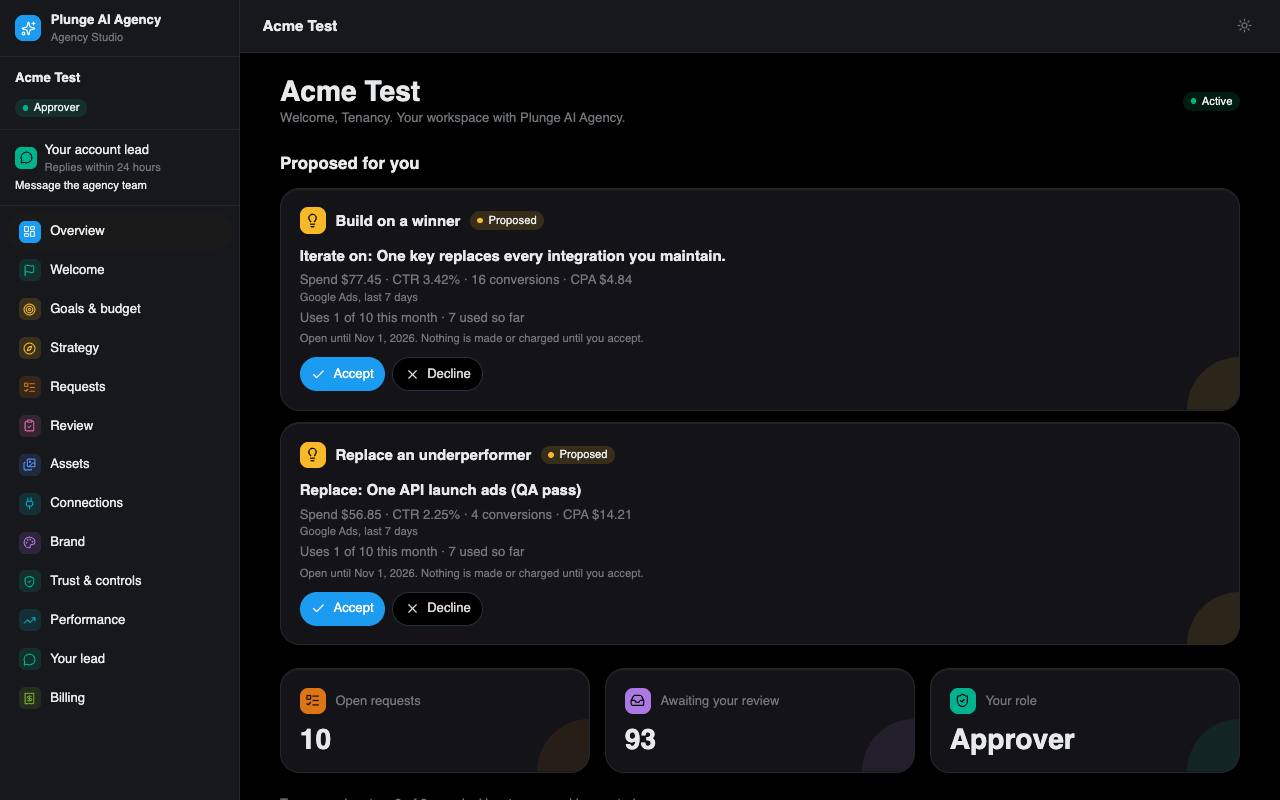
*Agency Studio › Overview: the home page of a client workspace.*
### Welcome checklist
The Welcome page tracks your setup in a fixed order and links each step to the page where it happens. It also holds the two things you do yourself early on: connect Google and send your first brief.
1. **Your approver is invited.** The agency invites the person who decides work.
2. **Your approver joined the workspace.** Done when they accept the invite.
3. **We drafted your brand profile.** Made from your website (see [Your brand](#your-brand)).
4. **Your free sample is ready.** Only for workspaces that started with the free sample at sign-up. For everyone else this step completes when the brand profile is live.
5. **Your brand profile is approved.**
6. **Your plan is active.** See [Billing](#billing).
7. **Google Ads and Analytics connected.** One Google consent covers both. A connect link works once, for 15 minutes.
8. **You set your goals and budget.** A spending envelope with a monthly cap, an outcome plan with at least one KPI and its baseline, and how you sell.
9. **Production is switched on.** The agency activates your production workflows.
10. **Your first brief is in.**
11. **Your first deliverables are produced.**
#### What we run for you
Below the checklist, **What we run for you** lists the channels the agency runs today and what it does there, the channels it runs only on request (TikTok and LinkedIn, not live) and what it does not offer (SEO and GEO content, influencer seeding, community management). Your approver can press **Request** next to an on-request channel: your account lead gets it as a message thread and answers within their reply time. A second request for the same channel waits for that thread to close.
### Your brand
Everything we make reads your brand profile and your approved claims. The Brand page is where you check them and keep them current.
#### The draft made from your website
We read your website and draft a profile in sections: positioning, audience, voice, visual rules, offers and more. Each section shows how sure we are. A section is marked to check when it is missing, too short, or contains a guess we flagged as unconfirmed.
1. Open Brand. Sections marked **Check this** need you; the others read **Looks right**.
2. Fix a section in place, or confirm it as it stands with **This is right**.
3. Decide every proposed claim (below).
4. Press **Approve my brand**. It stays off while a section still needs checking or a claim is undecided.
Once you approve, the agency's system makes it the live version within a few minutes. If your industry is regulated (health, finance and similar), a person at the agency checks the brand and its claims against that industry's rules before it goes live.
#### Approved claims
Claims are the facts, numbers, prices and comparisons our writers may state. The draft proposes claims from your site; you approve, reword or reject each one, and you can add your own. Each product you list with a price adds the claim "name: price". An automatic check fails any concept that states a fact or number that is not on the approved list.
#### Block list
Three lists, each up to 50 entries of up to 80 characters: **Banned words**, **Competitor names** and **Required legal lines**. The automatic checks read them on every concept: a banned word fails it as off-brand, a competitor name fails it on policy, and a landing page or email that lacks a required line fails too.
#### Learned rules
Every decision on our work adds a dated line to your brand, for example a decline with its reason. These lines go into every later run. Once your brand is live, an approver can edit the list.
#### Brand kit
- **Logo:** a PNG up to 1 MB, used in the image layouts with your headline and call to action.
- **Palette:** up to 8 colours.
- **Products:** up to 20, with prices. A margin you enter per product stays private and is never shown in ads.
- **Fonts** (up to 4), **product photos** (up to 20) and **past ads** (up to 30). You confirm you hold the rights to each file. Product photos can be given to the image model as references, and the descriptions of past ads join your visual rules.
#### Librarian proposals
Once a week, when there are enough new signals, the librarian reads your learned lines, comments and edits and proposes changes to your Do and Don't lists. The agency reviews each proposal; applying a set makes a new brand version. Earlier versions are kept and can be restored.
To suggest a change yourself, send a note from the Brand page. It goes to the agency.
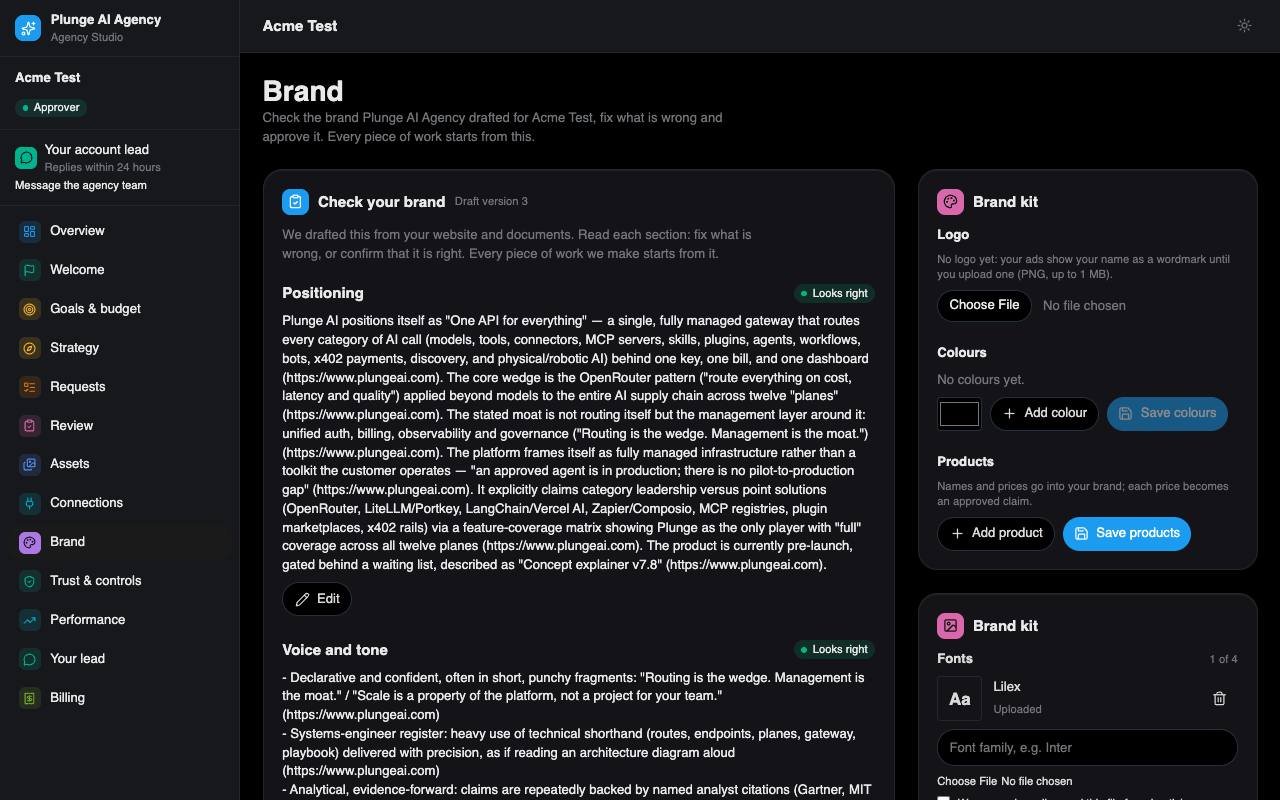
*Agency Studio › Brand: the profile, approved claims, block list and brand kit.*
### Goals & budget
Only your approver sets these. The agency reads them and cannot change them.
#### Spending envelope
**Monthly cap**
The most your campaigns may spend in a month. The daily ceiling for any launch is the cap divided by 30.
**Target cost per result**
Optional. Used by the stop rule.
**Order value or margin**
Your average order value or margin, so we judge results in your economics.
**Stop rule**
When on (the default), a campaign that runs above 2× your target cost for 7 days is paused. The cap pauses every campaign when it is reached, stop rule or not.
You get a notice at 50% and at 80% of the monthly cap. When a campaign is paused on budget, you and your lead are mailed, and you can resume it from this page; a resume at the cap is refused.
**Not live yet.** Pauses act on published campaigns, and publishing waits for Google's API access.
#### Outcome plan
Pick 1 to 3 KPIs, give a baseline for each, and optionally a target and the numbers of whoever did the work before us. Set a checkpoint 60 to 90 days out (75 by default). A week before the checkpoint, you and your account lead get a reminder.
#### GA4 property ID
Enter your Google Analytics 4 property ID (5 to 15 digits) so Performance can read your GA4 numbers next to the ad numbers.
#### How you sell
Your sales process, sales cycle, close rate, competitors, seasonality and the channels you have tried. Your account lead uses it to draft the monthly strategy you see on the Strategy page once they sign it.
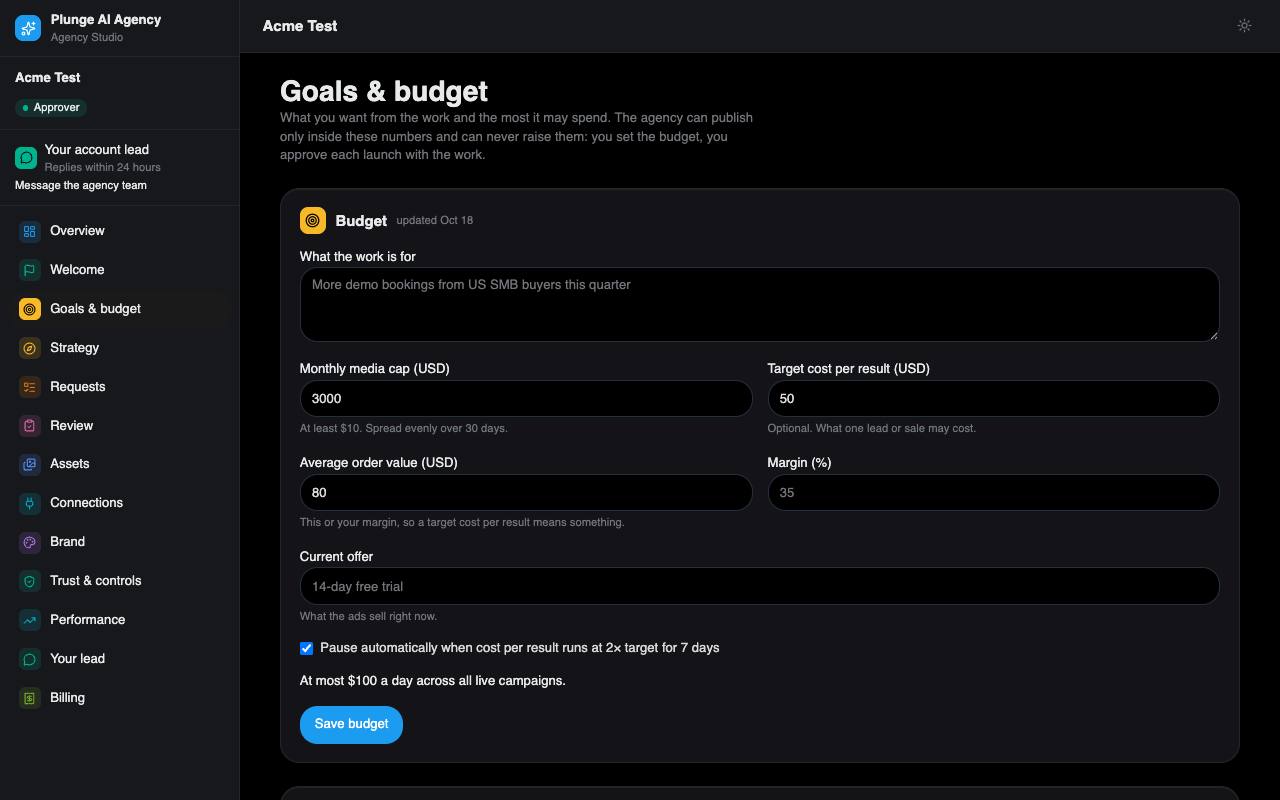
*Agency Studio › Goals & budget: the spending envelope and the outcome plan.*
### Sending a brief
A request is one brief. Approvers send it from Requests › New request (or from Welcome).
1. **Pick the service line.** Ad creative is always offered; landing pages and lifecycle email appear when your plan includes them.
2. **Write the brief:** title, objective, audience, offer, the channels you plan for, the image formats (1:1, 9:16, 16:9; the video formats — an 8-second clip, a 15-second short with captions, a 15-second presenter clip — only if video is on for your workspace), **Must say**, **Must not say**, the call to action and notes. A landing page also needs its call-to-action link (https) and the AI disclosure footer; a lifecycle email set asks for 1 to 4 variants.
3. **Name any real people or voices** the work should show (up to 5). Each needs a consent on file (see [Trust & controls](#trust--controls)), or the request is refused.
4. **Read the unit line and the turnaround** above the submit button, tick rush if you need it, and send.
**State only approved facts.** The writers may quote your brief, and the claims check fails any fact or number that is not on your approved list. Keep new facts out of the brief and add them as claims instead.
#### What one unit is
| Unit | Holds | Revision rounds |
| --- | --- | --- |
| Ad set | 3 to 6 concepts, each with its copy and one image per image format you ask for | 2 |
| Landing page | one landing page | 2 |
| Email set | 1 to 4 emails | 2 |
The unit line tells you what this brief costs before you send it: on a monthly plan, for example "Uses 1 of 8 this month · 3 used so far"; on a per-piece plan, the price of the piece and when your card is charged. Submit is off when no unit is left. If the price changed while the form was open, the form refreshes and asks you again.
#### Turnaround
Each kind of work has its own turnaround, counted from a complete brief and stopped while the work is with you. A revision has its own, shorter clock. The agency's current defaults:
| Service line | First delivery | Each revision |
| --- | --- | --- |
| Ad creative | 72 h | 24 h |
| Landing page | 72 h | 24 h |
| Lifecycle email | 48 h | 24 h |
| Custom | 120 h | 48 h |
A package can set its own first-delivery time for ad sets. A rush halves the turnaround, never below 12 hours. When the agency charges for rush, ticking it sends you a change order to accept first; when it does not, the rush applies at once.
#### After you send
The request starts in Intake, and the system takes it on at once: it assigns an owner (your account lead), makes the agency's internal cost estimate and starts production. If something stops it, such as no units left or an unpaid plan, the agency sees it and the request waits.
The agency may also propose requests from what performed: iterate on a winner or replace a weak ad. A proposal waits on Requests and the overview. Accepting uses a unit; declining needs a reason. A proposal expires after 14 days.
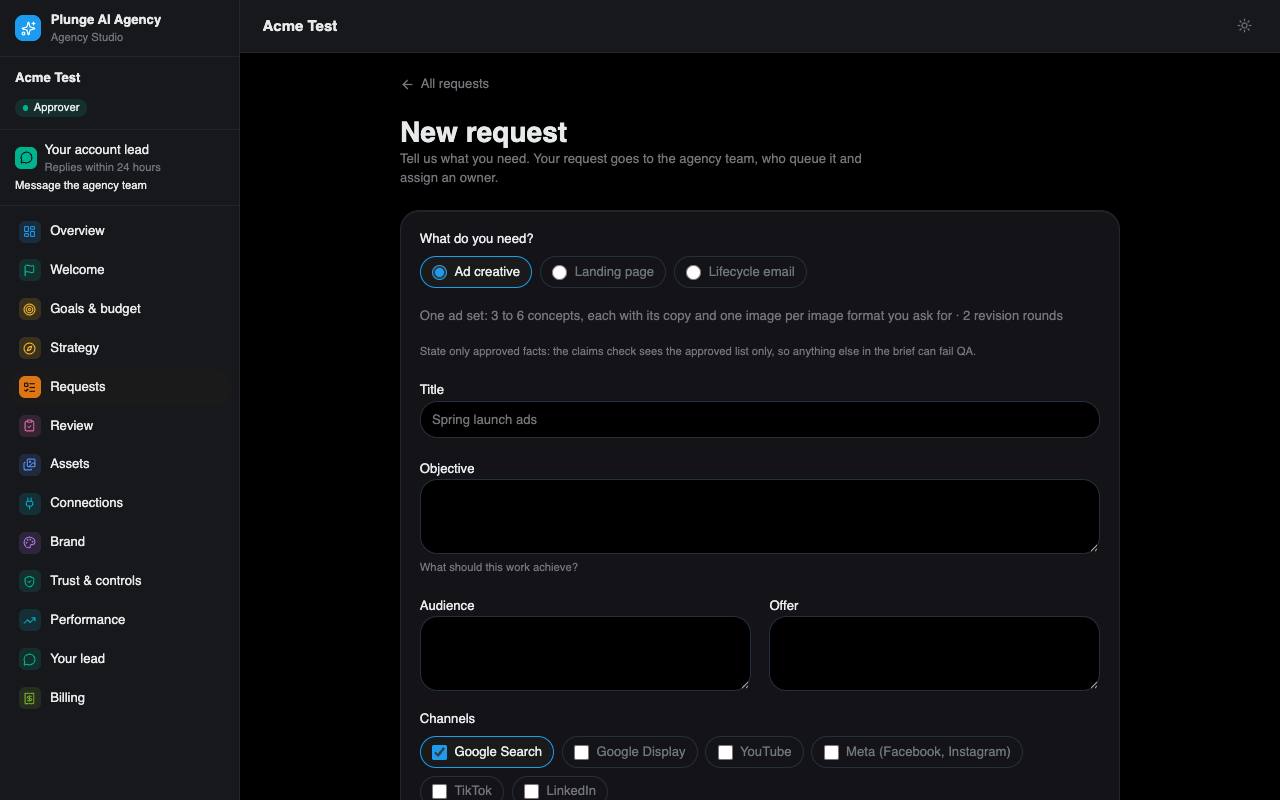
*Agency Studio › Requests › New request: the brief form with the unit line.*
#### While it is being made
If the agency switched the live view on for its clients, a request in production shows its steps as they finish (writing, checking, making images, and so on): only the steps, never the text in progress, the model or the cost. Your approver can **Stop** the run, or **Stop and change direction** with a note; the note becomes the steer of one new run. A stopped run is not retried and, on a per-piece plan, not credited: it was stopped on your request.
### Planned work
Planned work is work we start for you on a rhythm, without a new brief each time. Your approver sets it on the Planned work page; everyone else reads it. It draws only on a monthly plan's included pieces; a card on file is never charged for it.
#### A rhythm
- **Every so many days** (7 to 90) on a weekday you pick, or **before a date**: 1 to 60 days ahead of a date, once.
- A service line (ad creative, landing page or lifecycle email), a label, a standing brief (title and notes), 1 to 3 pieces a cycle, up to 4 audiences and up to 3 languages.
- Due at 09:00 in your time zone on its day.
Turning a rhythm on records a standing approval for that service line: the agency may start that work for you without asking each time. Turning it off ends it; when no other rhythm of the line rests on the approval, the approval is withdrawn too.
#### On the day
The scheduled job starts the cycle's pieces within what the plan has left this period, after any work in flight. If the agency has proposed requests for that line from what performed, those are accepted first, on your behalf, before a new request is made from the standing brief. When nothing can start (the plan is not active, or the period's pieces are used up), you get a notice, the agency sees it, and the next cycle that runs clears it. Each cycle is listed on your timeline.
### Reviewing work
Work reaches you after the automatic QA gate and a person at the agency. The Review page lists everything waiting for your decision, grouped by request.
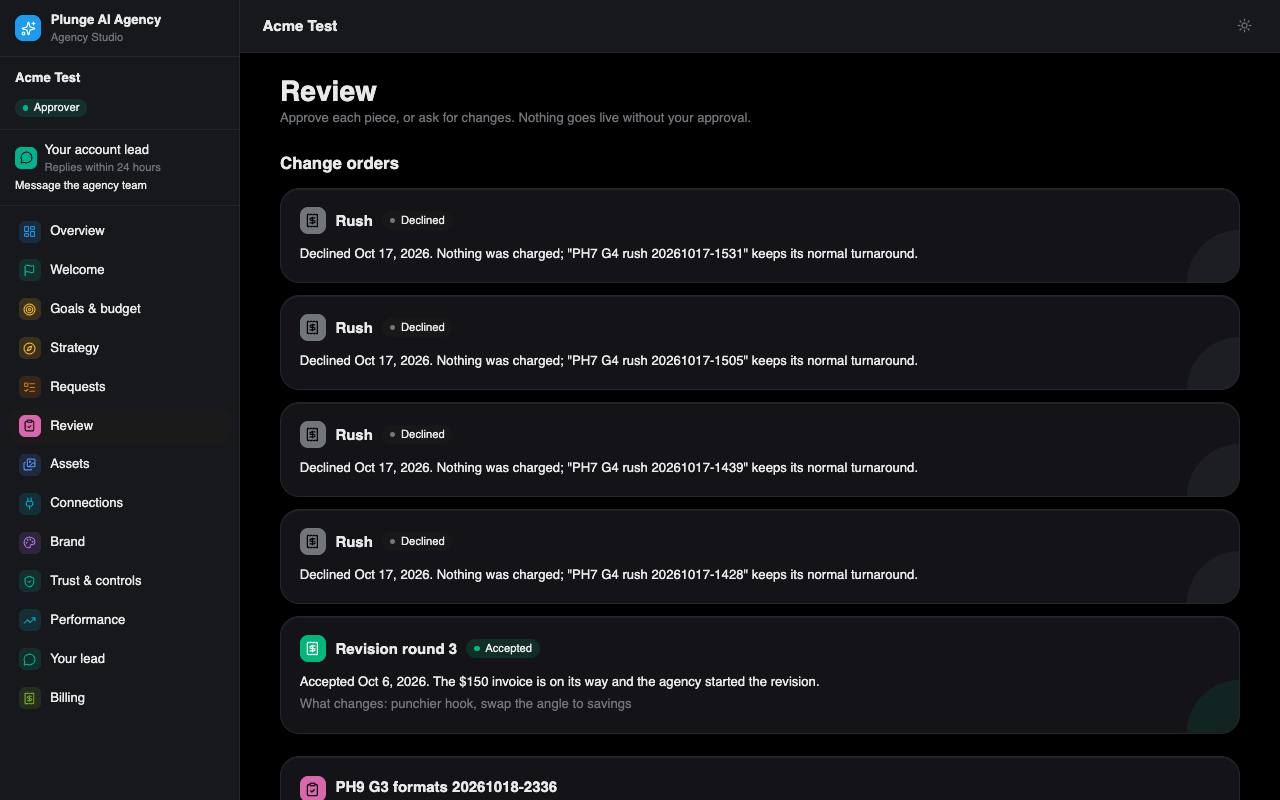
*Agency Studio › Review: work waiting for the approver.*
#### One deliverable
Open a piece to see it full size: an image, a clip, a landing page in a safe frame, or an email. The explain block tells you, in plain words:
- **The angle** the writer took, and what to test next.
- **The claims used**, taken from your approved list.
- **The QA line**, for example "Passed brand, claims and policy checks".
- **Who did what**: what AI wrote or made, what a person edited, who approved and when, plus "Reviewed by" the person at the agency who signed it off.
#### Your decision
| Decision | What you give | What happens |
| --- | --- | --- |
| Approve | Nothing | The piece is approved. It can be delivered, and published once publishing is live. |
| Request changes | A reason and a note | The agents make a new version from your note. It uses one of the request's revision rounds; past the included rounds it becomes a change order you accept first. The page tells you which round it would be before you send. |
| Decline | A reason and a note | The piece is closed. If you decline every piece of a version, the request closes and uses no unit. |
Reasons: Off-brand, Claim, Policy, Visual, Brief miss, Taste / preference. Every decision and note teaches your brand a learned line.
Also on the page: **notes** you can add at any time (the next round takes every open note), **Compare with previous** to see the last version side by side, and **comments**, which every user of the workspace can write.
#### Edit in place
An approver can fix the text of a piece in client review, such as a headline, without a new run or a revision round. The edit is checked against your approved claims and brand rules and logged on the piece.
#### Review by mail (magic links)
When work is sent to you, each approver gets a mail with their own links. A link opens the piece without signing in and records one decision. It stops working once used, once it expires, or when the piece was decided elsewhere or replaced, and the page says which. Reminders bring a fresh link.
#### Reply to a review mail
Each approver's review mail has its own reply address. Replying with **approve**, **decline:** and a reason, or **changes:** and what to change, on the first line decides the piece once, if the reply comes from that approver and passes the sender checks; anything else, or a second reply, reaches your lead as a message. A reply address works for seven days.
**Not live yet.** Replies by mail wait for the agency's inbound mail routing; until then use the links or the workspace.
#### Reminders and deemed acceptance
With the agency's default settings you get reminders 24 and 44 hours after work is sent. At 48 hours, if both reminders went out and you have accepted the terms, the request is marked deemed accepted: it counts once against your plan. It approves nothing, and publishing still waits for a real approval.
#### What approving means for billing
A request uses its unit when it first reaches Approved. On a per-piece plan your card is charged when you approve the piece (the default) or when you send the brief, depending on the agency's rule; the unit line says which. If an admin at the agency approves on your behalf, for example after a call, you see who did it and their reason on the timeline, in a mail and in the digest.
#### Delivery pack
On Assets, approvers can download one ZIP per request with approved work: the latest approved version of each piece, `copy.csv`, `manifest.json` with each piece's AI manifest, and a `README.txt`. A pack can hold up to 50 MB.
Notices that would land between 21:00 and 08:00 in your time zone wait until morning. Approvers also get a short daily note at 17:00 when something moved that day; you can switch it off.
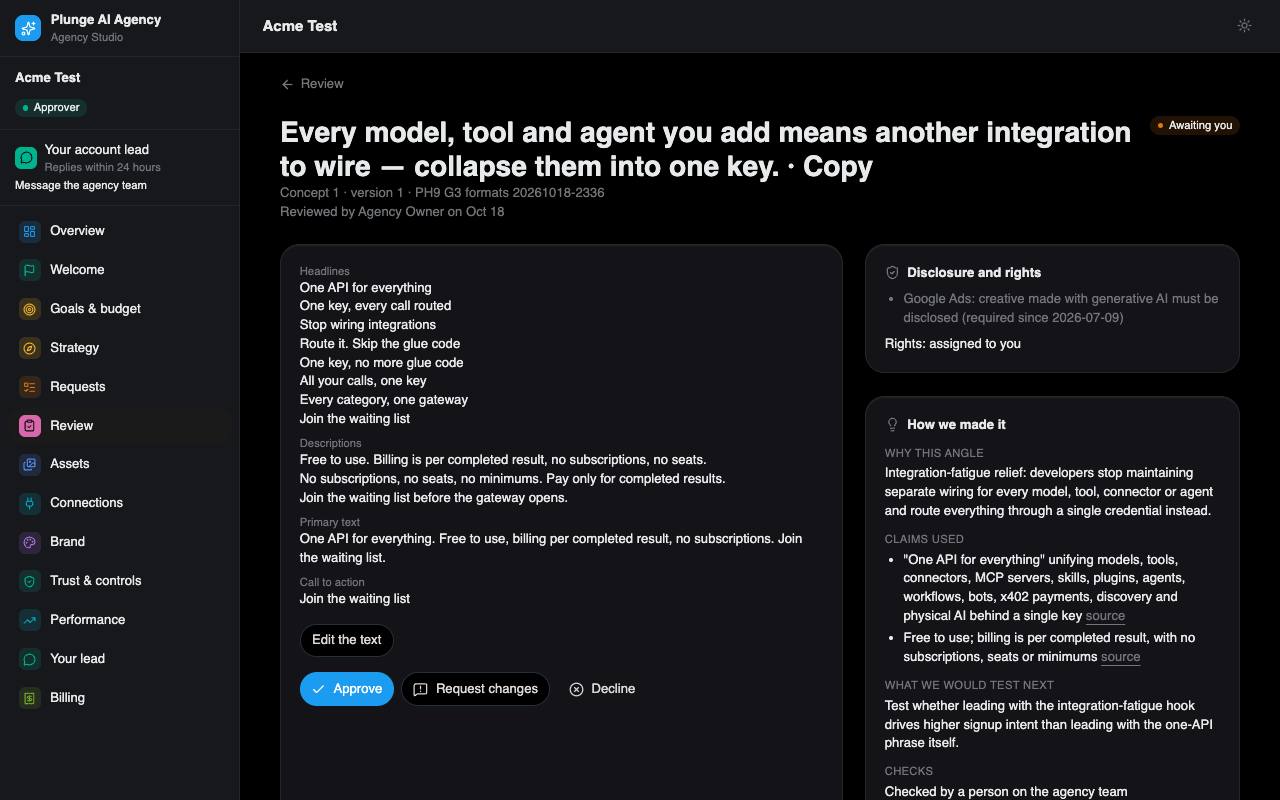
*Agency Studio › one deliverable: approve, request changes, decline, and the explain block.*
### Assets, performance, publishing
#### Assets
Approved and published work, each piece with its disclosure line and its rights record. Usage rights are assigned to you on delivery. See [AI disclosure](https://agency.plungeai.com/ai-disclosure) and [Rights](https://agency.plungeai.com/rights).
#### Publishing
**Not live yet.** Publishing is Google Ads only and waits for Google's API access. Until then you get the finished files in your workspace. When it opens, a campaign is created paused, within the daily budget you approved and your cap, and enabled as a separate step.
The **Campaigns** page is where your approver sets the campaign settings once (your Google Ads customer ID, the landing page, where keywords come from, your business name, and the disclosure checklist), and where each publish is listed with what Google last reported. When you approve a piece with its launch plan, the campaign is created paused; **Enable** shows what will change before it switches the campaign on, and **Pause** and **Revert** are one click. Nothing is enabled without you, unless you gave a standing approval that covers it (see [Trust & controls](#trust--controls)).
Once publishing is live, the agency reads your account every day: a campaign paused or removed in Google Ads itself is shown as such, spend over your cap is paused, and a problem it finds reaches you as a notice.
Lifecycle email: we write it but do not send it for you.
#### Email lists
If you buy lifecycle email, the **Email lists** page holds your lists. Your approver uploads a CSV with an email column and says why you may mail those people (they opted in, they are customers, or legitimate interest) and how the addresses were collected; the list is refused without it. Anyone on your never-mail list (unsubscribed, bounced, marked as spam, or added by you) is left out, and the page says how many. Your approver can add addresses to the never-mail list or remove the ones you added; an unsubscribe stays. We keep only a fingerprint of each never-mail address, never the address.
#### Performance
Daily spend, impressions, clicks and conversions per piece, read from your own accounts. Every number is labelled with its source. GA4 numbers are shown apart from the Google Ads numbers, so one conversion is never counted twice. The week report at the top says your number, what changed, what moved it and what is next; with too little data it says "too early" or "unknown", never zero.
You can import your own Google Ads or Meta export as CSV (up to 1 MB and 5,000 rows). Rows are matched to our pieces by tracking tag or title, you see a dry run first, and imported numbers are labelled "imported". An import only reads numbers you exported; Meta is not live as a channel.
If a landing page carries our lead form, the leads it collects appear here and are mailed to your approvers.
#### Share links
Your approver can share one approved or published image or video, or a performance report over a date range, with someone outside the workspace: a link that works for 1 to 30 days (14 unless you choose), no sign-in needed. The page shows the piece with its copy and disclosure line, or the report's totals, daily line and sources: never an id, a cost, a check or a run. The link is shown once, when you make it; the list on Assets and Performance shows each link's expiry and how often it was opened, and you can turn one off at any time. Search engines are told not to index it.
#### Weekly digest
A weekly mail to the users of your workspace on a set weekday and hour in your time zone, optionally posted to a Slack channel too: what shipped, the numbers, what we learned, and your account lead.
### Your lead
Your account lead is a named person at the agency. The sidebar card shows their name and reply time ("Replies within 24 hours" with the agency's default).
#### Messages
Write to your lead from the Your lead page. Each message starts the reply clock if no reply is pending. If the reply time passes, the system escalates it to your lead. Replies are mailed to every user of your workspace.
#### The account bot
If the agency switched it on for your workspace, you can ask the account bot about your account, for example what is waiting on you or where a request stands. It answers from your workspace's current state, up to 30 questions an hour. When you ask it to change, approve, publish, pay or decide something, or it has no answer, it hands the question to your lead in a message thread and tells you when they will answer.
When you ask it to do something it can do, such as start a brief, it offers it as one line with **Do it** and **Not now**. Nothing happens until you press Do it; an offer lapses after 15 minutes. It can also answer from your recent history: the last decisions, requests and publishes of your workspace.
### Learnings
Once a month, from the month's first Monday at your digest hour, we write a note on what we learned on your account: the winning pieces, the revisions and their reasons, the tests that ran, and what is proposed next. Every number in it comes from your stored results. It is mailed to everyone in your workspace who keeps the **Learnings** switch on, posted to your Slack channel when one is set, and listed on the Learnings page.
Each quarter your account lead sends a briefing: the agency's outlook, then the quarter's three notes. It appears on the Learnings page once it is sent, never before. The weekly digest carries a "What we learned" line between the notes.
### Team & notifications
#### Your team
Your approver invites teammates by email as approver or viewer (up to 20 invites a day), sees who invited whom and whether an invite was accepted, and removes people. The last approver cannot be removed: invite another first.
#### Where notices go
The approver sets one Slack incoming webhook for the workspace (the URL is kept, never shown back) and the weekly digest's weekday and hour.
#### Your own mail switches
Everyone chooses which mails reach them: **Weekly digest**, **Review requests** (a link to approve new work, no sign-in needed), **Notices** and **Learnings**. A viewer has the digest and learnings only. Billing mails, payment holds, change orders and decisions made on your behalf always go to the approvers. If every approver switched review requests or notices off, the first approver by email still gets them, so nothing waits unseen.
#### API keys
**Not live yet.** Making a key waits for the platform's MCP gateway; until then the page says keys are not available yet.
An approver can give an AI assistant that speaks MCP access to the workspace with a key from the **API keys** page. With the key it can read your requests, pieces, results and invoices, send a brief, and approve, ask for changes on, or decline a piece. It acts as you, with the same rights you have. Your workspace can hold up to five live keys. A key is shown once, when you make it, and you can revoke it at any time. A key allows 60 calls a minute.
### Trust & controls
#### AI restrictions
Three switches your approver sets; everyone else reads them:
- **No AI-made people.**
- **Show the product only from photos you supplied.**
- **Video off.** Every video format is then refused on new briefs; **No AI people** alone refuses the presenter clip.
Production follows them as hard rules, the checks enforce them, and a piece that shows a person or your product waits for a person at the agency before it can reach you. Testimonials, reviews, ratings and endorsements are never invented: one may appear only when it is quoted from your approved claims.
#### Standing approvals
Once your own decisions show a line of work rarely needs changes, your approver can let it go out without a click. The score counts only your approvers' decisions: a clean approval counts 1, an approval after an edit or on a revision counts half, a decline 0, over your newest 20 pieces of that service line and channel; the agency's default needs 0.9. A standing approval names what it covers (approve, publish, switch a campaign on), waits 24 hours after the piece is sent so you can still decide or keep it for yourself, and never covers more spend than you last approved, a new audience or new keywords, a person or your product in the piece, a claim you have not approved, or anything your AI restrictions touch. **Turn off** ends it at once.
**Not open yet.** Standing approvals open once the agency switches on automatic review; until then the page says so.
#### Likeness consents
Record each real person or voice the work may use: name, kind (likeness or voice), scope, an optional expiry and evidence (PDF, PNG or JPEG). Revoke one at any time; the next production that names that person is then refused.
#### Case studies
The agency writes up a result of yours as a public case study only with your approver's consent, given here. **Name in it** decides whether your company is named or the study stays anonymous. Every number in a case study is one we measured on your account (your outcome plan's KPIs over the baseline window against the last 90 days, with GA4 kept apart), and each study states how it was measured; the method is public at [/kpi-method](https://agency.plungeai.com/kpi-method). Withdrawing consent takes every published study of yours down at once.
#### Your data
Approvers can download the workspace's data from the Billing page at any time. If a plan is cancelled, you are warned 7 days before the agency's access to your connected accounts is removed, and you can choose to keep the connections.
The policy pages: [AI disclosure](https://agency.plungeai.com/ai-disclosure), [Rights](https://agency.plungeai.com/rights), [Privacy](https://agency.plungeai.com/privacy), [Terms](https://agency.plungeai.com/terms), [Security](https://agency.plungeai.com/security) and the [data processing agreement](https://agency.plungeai.com/dpa).
### Billing
Packages are listed on the [home page](https://agency.plungeai.com/#packages). There are two kinds:
- **Monthly retainer:** a number of units per month, the revision rounds per request and a turnaround.
- **Per piece:** a card on file, charged one piece at a time at the price the unit line showed you.
#### Starting a plan
1. Open Billing. The agency has prepared your plan.
2. Tick **I accept the terms** (the version is shown).
3. Press **Start this plan** and pay in Stripe Checkout. For a per-piece plan, **Save a card for per-piece work** stores the card and charges nothing yet.
Stripe runs in test mode today.
A workspace has one active plan at a time. Production starts only while it is active. Approvers can pause, resume or cancel from Billing; you get a reminder 7 days before each renewal. A burn meter shows the units used and where the month is heading.
#### Change orders
A revision past the rounds your plan includes, or a paid rush, is a change order: a card on Review, the request and Billing with its amount. Accept it to have it invoiced and the work start, or decline it.
#### When a payment fails
You have a 3-day grace period with a banner and an **Update card** button. After that, new work is on hold until the payment goes through. Reviews, approvals and downloads keep working.
#### Credits and refunds
- On a per-piece plan, if a run fails and its automatic retry fails too, the piece's fee is credited back to your Stripe balance.
- If we miss a turnaround round, a piece you paid for on its own is credited at its price, and a piece from a monthly package does not count against it.
- Refunds are issued by the agency; you get a mail when one is made.
#### Outcome fee option
The agency may offer, on your plan, a fee per confirmed lead or sale (a KPI your outcome plan names) with a monthly cap. The offer shows on Billing and changes nothing until your approver accepts it. From then on, on the 1st of each month, last month's confirmed units are invoiced at the fee, up to the cap. Confirmed means counted in your own GA4; numbers the ad platform reports are shown next to them but never billed. A month with nothing confirmed is skipped.
#### Refer a business
While the agency's referral programme is on, Billing shows your referral code and link. A business that signs up through it and starts a plan earns you the credit the tile names on your Stripe balance, once per referred business. Referring yourself (the same people, email domain or website) earns nothing.
#### Several brands, one bill
If the agency groups several of your brands or locations, one of them holds the plan and the others show it read-only as "Billed to ". The approvers of the brand that pays are invited to each grouped workspace.
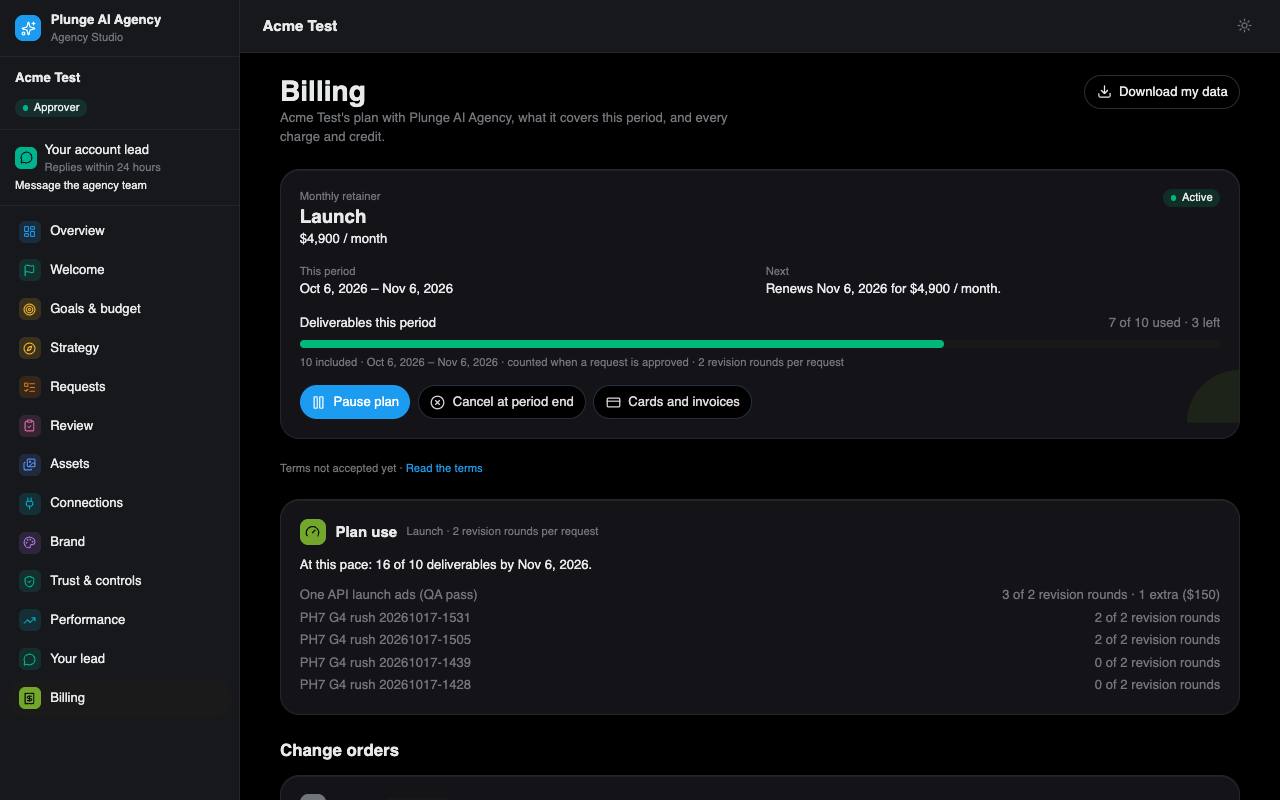
*Agency Studio › Billing: the plan, terms, invoices and data download.*
## For the agency team
How to run the agency from the Dashboard at [agency-dashboard.plungeai.com](https://agency-dashboard.plungeai.com). You sign in with your Plunge AI account. An owner or admin adds you by email first, and the invite is linked to you the first time you sign in with that email.
### Roles
There are five roles, ranked: **owner** above **admin** above **strategist** above **reviewer** above **viewer**. A role may do everything the roles below it may do. The table names the lowest role each action needs; the server checks it on every call, so a button you cannot use is also refused if you call the API.
| Lowest role | What it adds |
| --- | --- |
| viewer | Read every section, client page, request, timeline, brand version and the ledger. Viewers cannot be a client's account lead. |
| reviewer | Decide deliverables in the Review queue (approve, request changes, reject), re-run a request with a steer, dispute a QA failure, read the Exceptions queue, reply to and close Inbox threads. A reviewer or above can be named a client's account lead. |
| strategist | Create requests, quote and produce, set a launch plan, send work to the client, cancel and re-queue requests, resolve exceptions (retry or dismiss), convert and move leads, decide and reword claims, approve a brand version, edit the block list and brand kit, apply or reject librarian proposals, restore a brand version, edit copy in place, import performance files, set the GA4 property. |
| admin | Activate and re-sync clients, plans and checkout links, invoices, decide change orders, publish, enable and pause campaigns, approve on the client's behalf, render lockups, set the account lead, pilot flag, open book and industry category, Members, Settings, the Quality page and eval runs, Pilots, the margin page, the client data export, run a scheduled job now, the mail test, the outbox list, the account bot. |
| owner | Change the Rulings, record owner items, refund a ledger line, retry a failed per-piece charge, the "Billed by hand" switch, erase a client or a lead, re-home the agency, skip the evals gate (with a reason), read an outbox payload, send a researched lead reply draft is admin+ but only the owner gets the draft-ready mail. |
One exception to the ranking: the monthly strategy memo is signed by the client's account lead, whatever their role.
### The daily loop
Most of the work runs by itself (see [Production](#production) and [The clock](#the-clock)). Your day is the four places where the pipeline waits for a person, in this order:
1. **Review queue.** Every piece the QA gate passed or held lands here in internal review. Decide each one. A request goes to the client the moment every piece of its latest version is decided.
2. **Exceptions.** The Open tab, oldest first. Each row says what stopped and what to do: retry once the cause is fixed, open the request, or dismiss it with a note.
3. **Inbox.** Client messages to their lead, the one due soonest first. Reply within the lead reply time (24 hours until the owner rules otherwise), then close the thread when it is done.
4. **Requests board.** Look for work stuck in a status and for SLA warnings. A request in the last 20% of its turnaround window is marked, and its account lead gets a mail.
#### What the pipeline does alone
- Takes on a client's brief: assigns the owner (the account lead), stores the quote and starts production, or opens an exception saying why not.
- Checks every concept in the QA gate, breaks ties, checks every image, and repairs a failing ad set once.
- Retries a failed run once. Credits a per-piece fee when no retry follows.
- Sends a version to the client once you decided all of it, sends reminders, and marks a request delivered when the client approved it and nothing will publish it.
- Sends the weekly digest, renewal reminders, payment-hold notices and the other client notices.
#### Where a person is needed
- Internal review of every piece before it reaches the client.
- Exceptions, including QA holds (a split vote or an image that could not be checked).
- Change orders: the client accepts them in Agency Studio, or an admin decides one in the Dashboard.
- Publishing (Google Ads only, and not live until Google grants API access).
- Signing the monthly strategy memo, replying to clients, sending lead reply drafts.
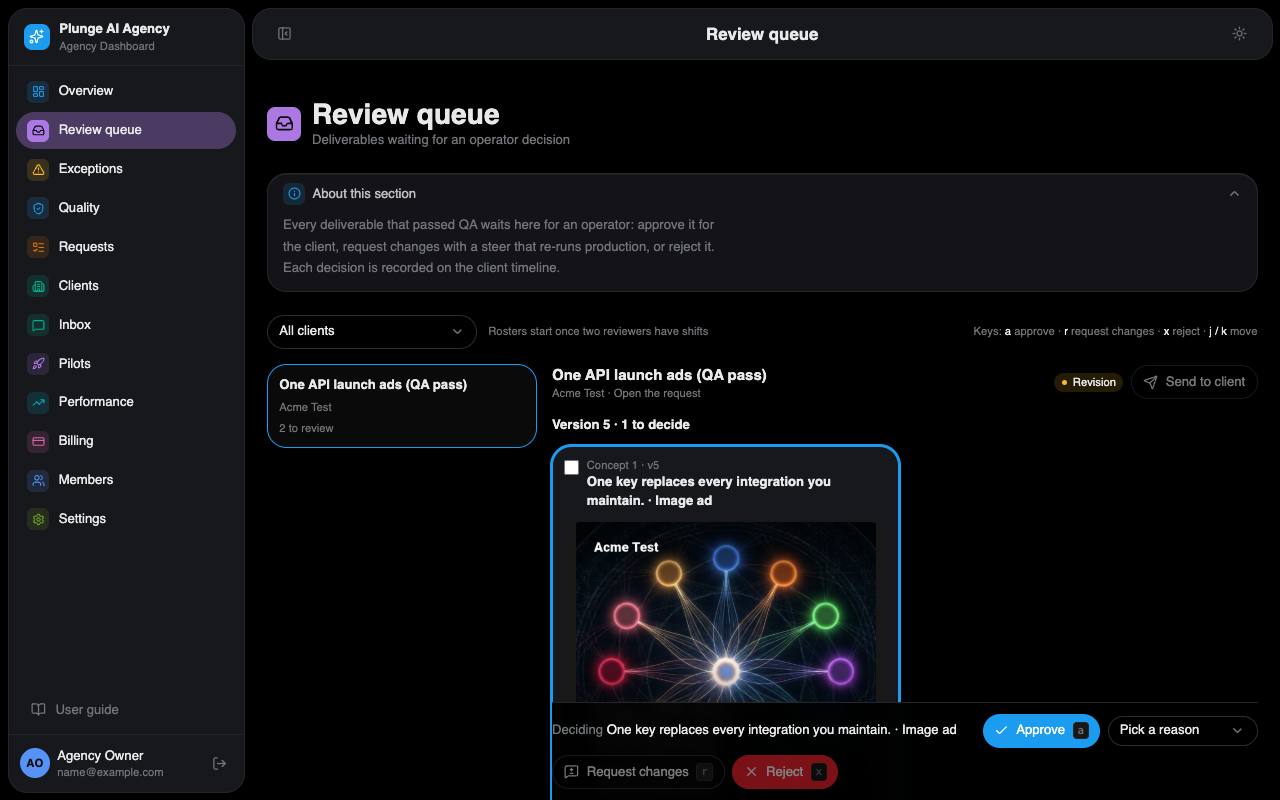
*Dashboard › Review queue: each piece with its QA outcome, the decision bar and the steer dialog.*
### The Dashboard nav
The sidebar has twelve sections. Each page opens with an "About this section" note; this is the short version.
#### Overview
Who is on the team and in which role. Admins and owners also see one month of operating metrics: automation rate, human minutes, cycle time, throughput, turnaround attainment, quality, open exceptions and revenue per member, and the reviewer load tile: each reviewer's reviewed time against their weekly hours and the queue wait (median and 90th percentile). A number that cannot be computed shows "—" with the reason.
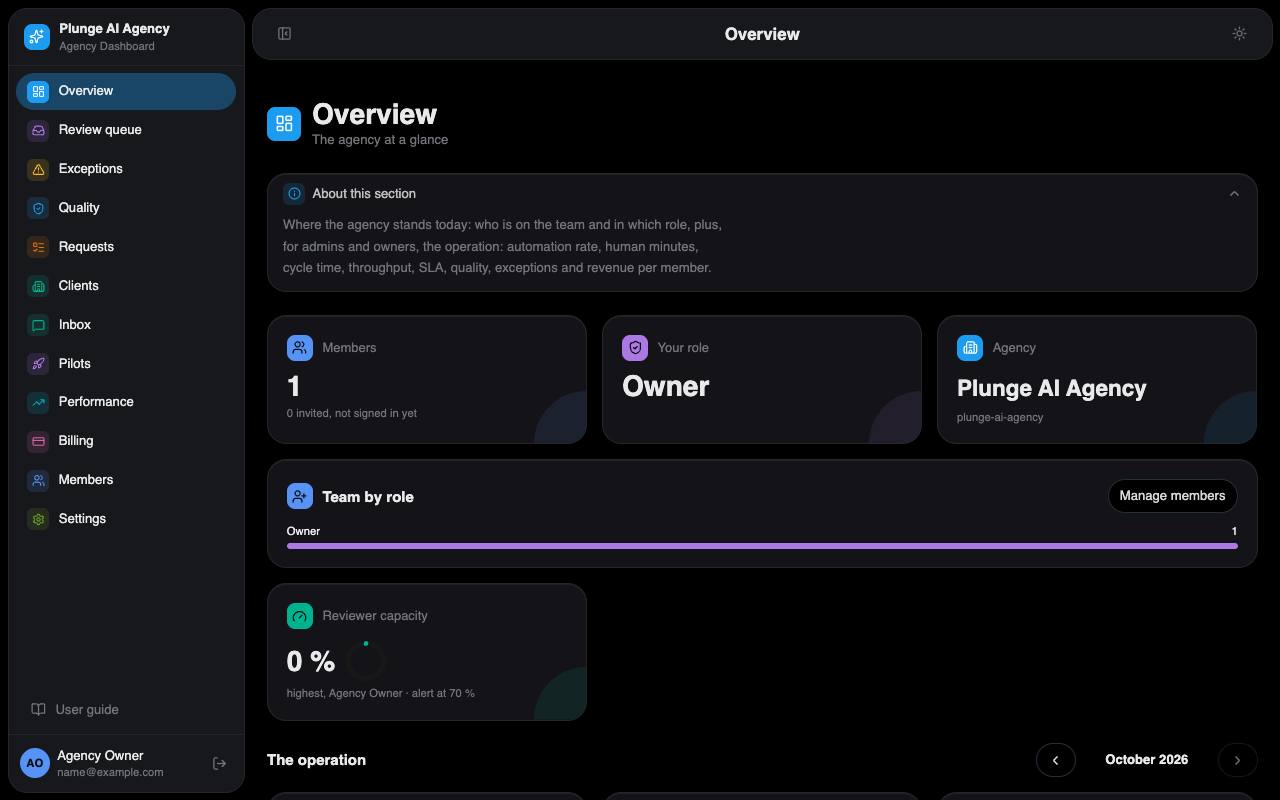
*Dashboard › Overview: the team and, for admins and owners, the operating metrics.*
#### Review queue
Deliverables that passed QA or were held for a person. Approve one for the client, request changes with a steer that re-runs production, or reject it. Each decision needs a reason when it is not an approval (off-brand, claim, policy, visual, brief miss, taste) and is recorded on the client timeline. The card shows the QA panel, the decision packet (brief, claims used, the prior version next to this one), comments and, for images, the lockup button. Your review time is measured while the page is visible and you are active; you do not type it. Once two members have shifts on Members, the roster is active: a request entering internal review is assigned to the reviewer on shift with the fewest already assigned, and the queue gets a **Mine / Everyone** toggle.
#### Exceptions
What the pipeline could not do by itself, one row per cause: Retry, Open request, or Dismiss (a note of at least 3 characters). The request owner gets a mail when a row opens. The **Escalations** tab holds the rows that need a person to answer a client (a question the bot handed over, a client thread past its reply time, an email reply that needs a look), each with its owner and reply-due time. See [When something stops](#when-something-stops).
#### Quality
Admins and owners. How often the QA gate and the people who decide after it agree, severe misses (the gate would pass work a person sent back for a claim or policy reason), false passes and fails, disputes, copy flips, first-pass and repair rates. Every overrule and dispute is listed and can be added to the golden set the gate is tested against. The Eval runs tile starts and lists test runs of the gate.
#### Requests
The board of every brief by status, with SLA timers, and **New request** for strategists. See [Requests](#requests-1).
#### Clients
Every client with its status (lead, onboarding, active, paused, churned) and the **Leads** tab: start-form leads with their package, fit answers and the reasons of the sign-up gate. From a lead you can mark it contacted, waitlist it, close it or convert it into a client. Admins see the sign-up funnel there too.
#### Inbox
Every open "Message your lead" thread across clients, the one due soonest first. A reply mails the client's users and stops the reply clock.
#### Pilots
Admins and owners. Design-partner clients: the seats in use against the seat cap, and each pilot's time to first deliverable, revision rounds, approval rate and turnaround against the incumbent numbers the client entered at kickoff.
#### Performance
Daily spend, impressions, clicks and conversions per published creative, read from the client's Google Ads account, with GA4 kept apart so a conversion is never counted twice. Live reads wait for Google's API access; until then the numbers come from CSV exports a strategist or the client imports. The week report sits on top.
#### Billing
Plans, invoices and change orders per client, billed through Stripe (test mode), with the margin page next to it. Outcome fee offers, referrals and billing groups live on each client's Plan tab. See [Billing operations](#billing-operations).
#### Members
The team. Owners and admins add people by email and set their role, time zone, weekly hours and shifts (a weekday and two times in the member's own zone, up to two a day). Weekly hours feed the reviewer load; shifts feed the roster.
#### Settings
The agency account, its defaults (including whether clients watch production live, the reviewer load alert and the quarterly briefing's opening), the packages, the owner's Rulings and the owner items. See [Settings](#settings-1).
### Running a client
A client goes from lead to first request in this order. The client page's onboarding checklist shows the same steps with what is done.
1. **Lead.** A prospect fills in the start form on the site. A sign-up for the entry package that passes the fit gate and gets a seat becomes a client by itself, with a draft plan and a checkout link. Anything else stays a lead for you.
2. **Convert** strategist. Clients › Leads › Convert, optionally with a package to draft the plan from. If the business is already a client, the lead is closed onto it instead.
3. **Invite the approver.** Converting invites the lead's email as the client's approver; add more client users on the Client users tab.
4. **Brand ingest.** An ingest run reads the client's website and writes a brand draft with proposed claims. Sign-up clients get it started by the scheduled job.
5. **Sample.** A sign-up client gets one free sample: three square display images, made on the draft brand, shown to the approver in Agency Studio. Capped per domain and per day by the Rulings.
6. **Brand approval.** The approver confirms or fixes each section and approves the brand in Agency Studio; a strategist can approve a version on the Brand tab. A client in a regulated industry opens an exception and waits for that approval.
7. **Activation** admin. The Production tile saves the client's workflows. It refuses without an approved brand, and while the evals gate is shut (the QA rules of the client's templates have no passed eval run). Only the owner can skip the gate, with a reason that is recorded.
8. **Plan** admin. Draft a plan on the Plan tab, then send the checkout link. The link waits until the client has accepted the terms in Agency Studio.
9. **Google connection.** Connect `google` on the Connections tab: one consent covers Google Ads and GA4. A connect link works once, for 15 minutes.
10. **Goals.** The client sets the spending envelope and the outcome plan in Agency Studio. You read them on the Goals tab; you cannot write the envelope.
11. **First request.** The client sends a brief, or you create one.
#### The client page
**Client users**
Approvers and viewers, invites and their state.
**Connections**
The client's Google connection and its health. A required connection that drops mails the owner once.
**Lead**
The account lead (reviewer or above). A change mails the client's approvers.
**Goals**
The envelope, read-only ("Set by the client"), the outcome plan's progress, targets and "Pull baseline" (needs Google's API access).
**Strategy**
Discovery (how the client sells), the monthly strategy memo the account lead edits and signs, and the quarterly briefing: drafted by the job from the agency's opening text and the quarter's three learnings notes, edited by the lead (strategist or above) and sent to the client's approvers; the "Quarterly briefing drafted" exception closes with the send.
**Brand**
Versions, the draft, learned lines, librarian proposals, the block list and the brand kit. See [Brand operations](#brand-operations).
**Claims**
Proposed, approved and rejected claims; approve, reject or reword.
**Trust**
The client's AI restrictions and likeness consents, read-only, and the client's share links (what was shared, by whom, until when, how often opened; a link is never turned off from here).
**Plan**
Plans, the terms line, the checkout link, invoices and the ledger with the owner's refund; on the plan card the outcome fee offer (admin); the referrals tile (the client's code and link, the credits earned, who it referred and who referred it); and billing groups.
**Planned work**
The client's rhythms, read-only: rhythm, pieces a cycle, next and last due in the client's zone, on or off, the standing approval behind it. Admins see "What would start now" for a rhythm: the plan of the cycle without starting it.
**Case studies**
The client's consent (and whether it may be named), the numbers measured now or why none can be, and the client's studies. The owner drafts one with the numbers measured now, edits its title, slug and Markdown, publishes and unpublishes; a publish refuses a figure the text states that was not measured.
**Digest & Slack**
Digest weekday and hour, the client's Slack webhook (write-only), a test send.
**Timeline**
Every event of the client, in operator wording.
**Profile**
Name, website, industry, service lines, video, time zone and the other client settings.
Above the tabs sit the onboarding checklist and the Production tile (each template's eval state, Activate and Re-sync). Admins also get "Download client data"; the owner gets the erase card.
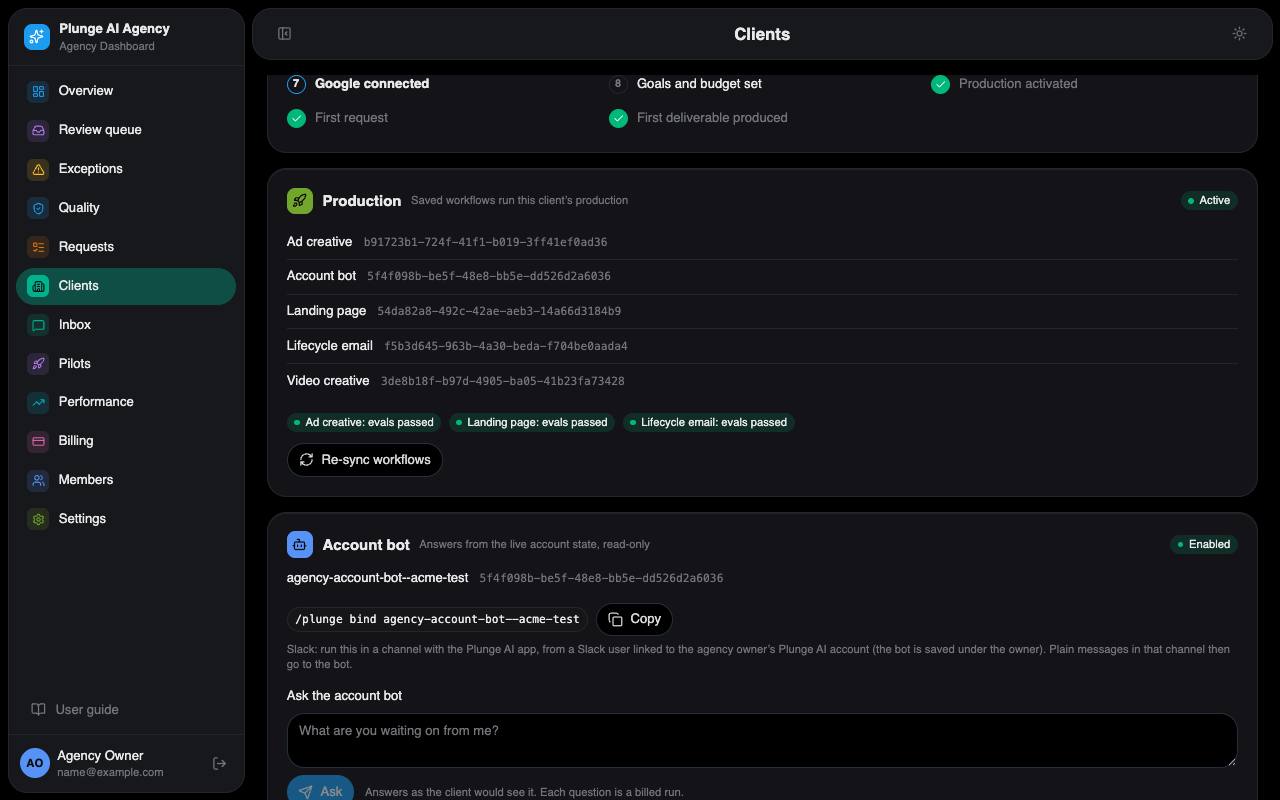
*Dashboard › one client: the checklist, the Production tile and the tabs.*
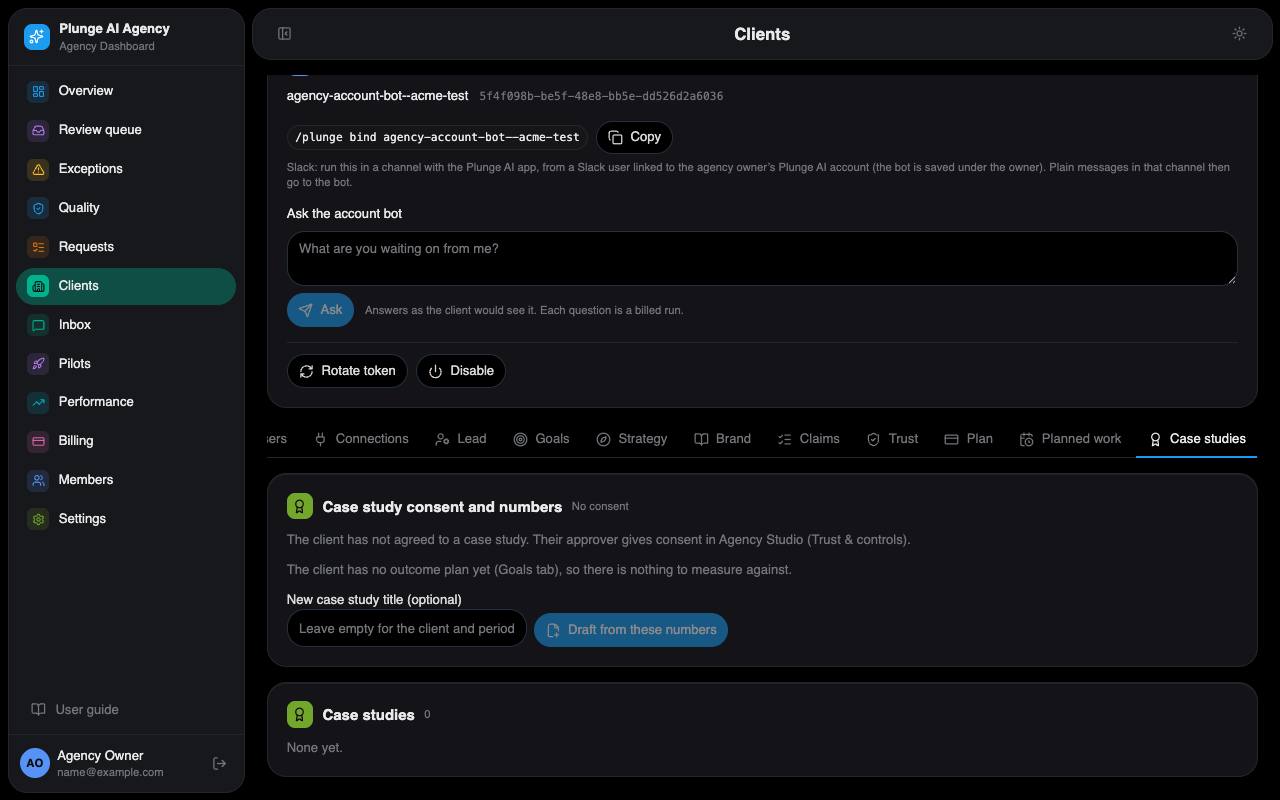
*Dashboard › one client › Case studies: the consent and the numbers measured now, then the client's studies.*
### Requests
#### Statuses and the board
The board shows one column per status, left to right: Proposed, Intake, Queued, In production, QA failed, Internal review, Client review, Revision, Approved, Published, Delivered, Cancelled. Every allowed move is drawn in [the request lifecycle](#the-request-lifecycle); a move outside it is refused. A client's brief starts in Intake, one you create starts in Queued. Free samples are kept off the board.
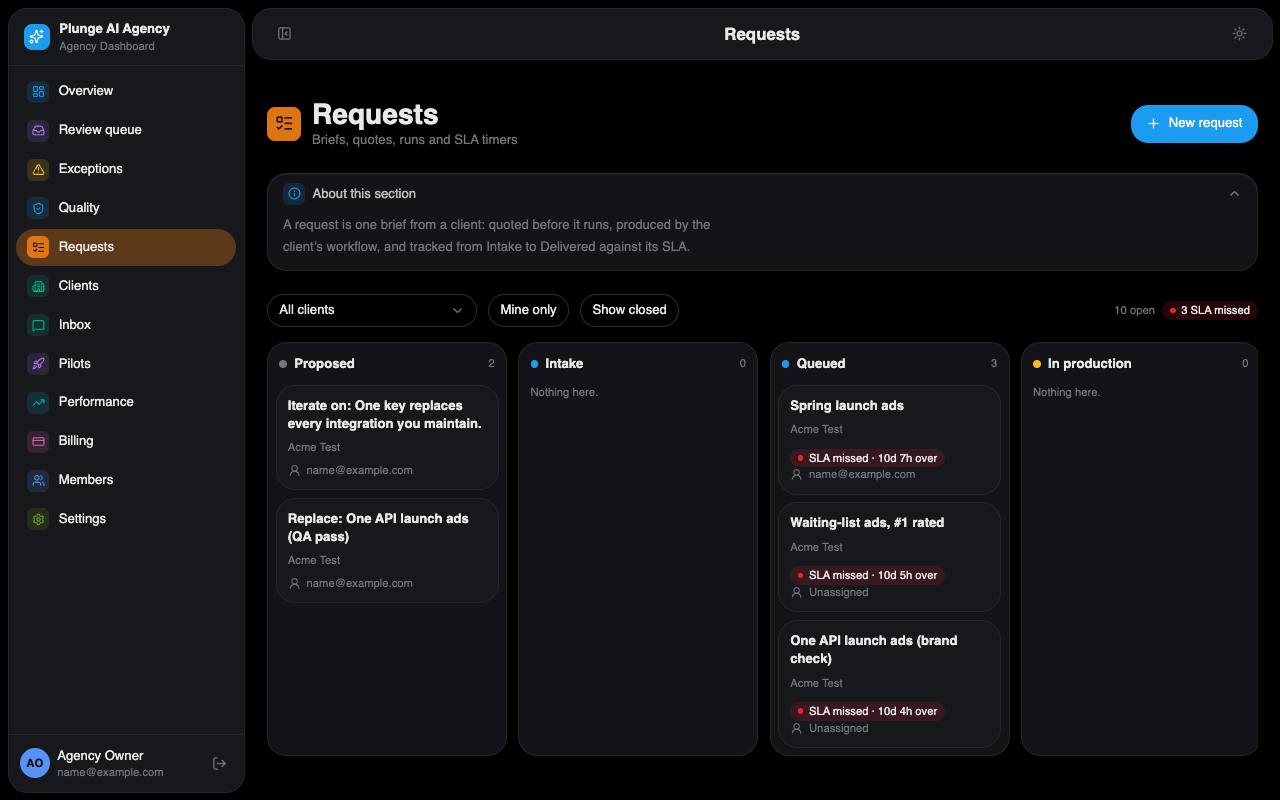
*Dashboard › Requests: the board with SLA timers and New request.*
#### New request
strategist The same brief form the client has, offering exactly what the client buys: ad creative always, a landing page or lifecycle email when the client's service lines list them, the video formats only when video is on. The unit line above submit shows what the brief uses of the plan. Keep facts the client has not approved out of the brief: the writer may quote the brief, and the claims check only knows the approved claims.
#### Quote and produce
The quote is the agency's internal estimate of the run's platform cost; the client never sees it. **Produce** strategist refuses, before anything starts, when:
- the request is not Queued or in Revision, or has no quote;
- the quote is above the agency's quote limit (produce again with the quote confirmed);
- the client has no active plan, the plan is paused or unpaid, or past due for more than 3 days;
- a per-piece charge due at submit is not paid;
- the brief lacks its landing-page or email section;
- the client is not active, has no approved brand, works in a regulated industry with no industry pack enabled, or names a person without a valid consent.
The button shows the refusal it got. A started run moves the request to In production; a start the platform refuses puts it back.
#### The production record
Each run is recorded on the request with its concept count, quote, revision source and steer. The receipt "What the agent did" lists the run's steps, models and cost without any content. Log your own time with **Log time** (judgment or product gap); it feeds the margin page.
#### Watching a run
While a run is in production the request page shows its lanes as they are written, refreshed every 5 seconds, and who else is watching. **Stop** strategist asks the platform to cancel it; a stopped run is never retried or credited. **Stop and steer** with a note (up to 2,000 characters) cancels it and starts exactly one new run with the note as its steer, at the same quote and concept count. If the agency's setting "Clients watch production live" is on, the client's approver can do the same from Agency Studio, seeing only the steps.
#### Versions and the QA panel
Each run makes a version. Its pieces show "Checking" while the gate works, then "QA: n passed · n failed · n held". The QA panel lists the findings with failures first, each rule's two votes, a flip marked "the copies disagreed", the holds and the shadow badge ("Gate: would pass / would fail"). Failed concepts are listed with their reasons.
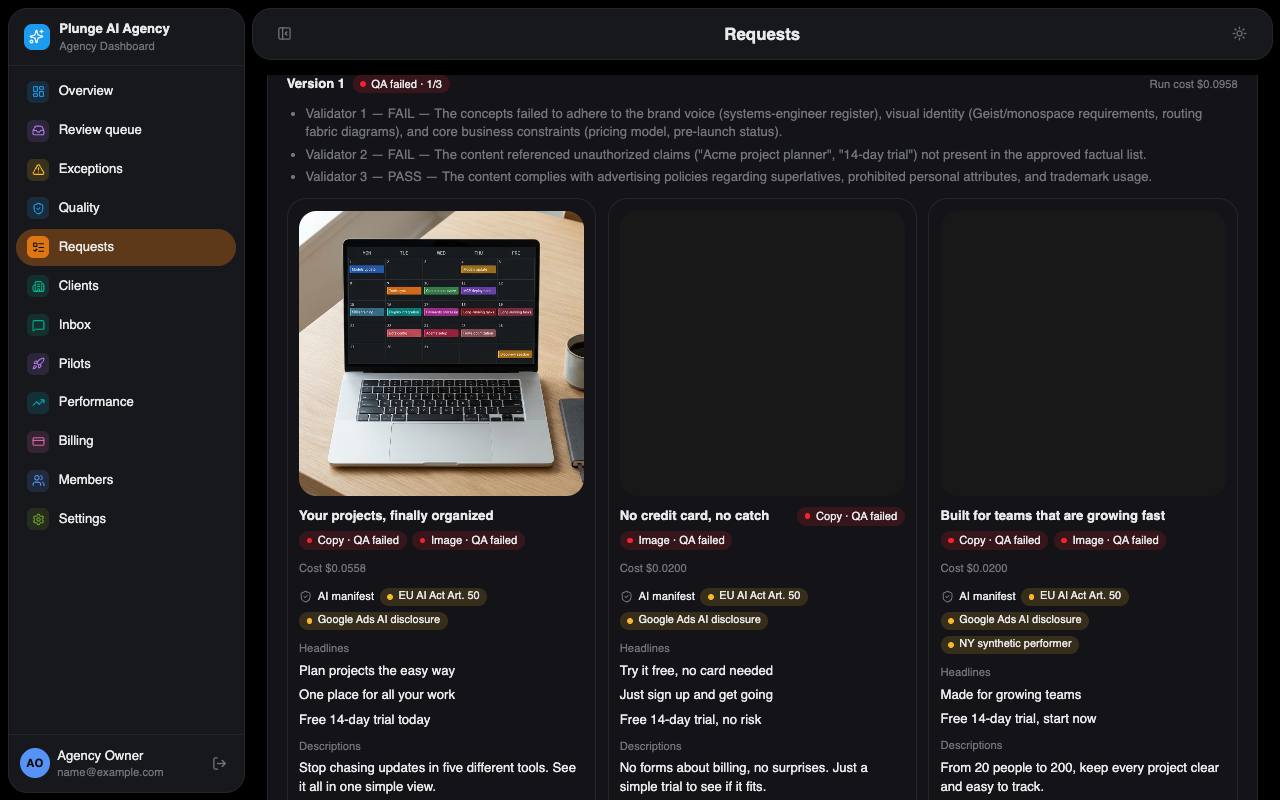
*Dashboard › one request: production, versions, QA and decisions.*
#### Review decisions
reviewer Approve, Request changes (with a steer) or Reject, one piece or up to 50 at once. Request changes does not start a run by itself; **Re-run with steer** does. An operator's request for changes never reaches the client's timeline.
#### Sending to the client
When every piece of the latest version is decided, the version goes to the client by itself: one review mail per approver with their own magic links. **Send to client** strategist sends again by hand. A client with no approver opens an exception. A piece that shows a person or the product while the client restricted them waits for an operator's approval first.
#### Revise with steer
reviewer Re-runs production with your note as the steer, for the whole concept, the copy only or the image only (ad creative). Open client notes are added to the steer. Above the confirm you see the round ("Round 2 of 2 included") and the estimate. Past the plan's included rounds the re-run becomes a change order the client accepts first.
#### Approve on the client's behalf
admin "Approve for client…" on a piece in client review, with a reason of 10 to 500 characters. The client sees the reason word for word on the timeline, in the mail, the digest and the export. This is the only way an agency approval counts for publishing.
#### Launch plan and publish
A launch plan strategist sets the daily budget and dates; it is refused without the client's spending envelope or above the daily ceiling (the monthly cap ÷ 30). The client's approval keeps a copy of it. Publish admin is Google Ads only and needs the client's approval, the disclosure checklist ticked, a budget inside the approved one and a connected Google account. It creates the campaign **paused**; add keywords in Google Ads, then Enable. Publishing is not live today: it waits for Google's API access.
#### Cancel
strategist Cancelling a request resolves all its open exceptions. A cancelled request uses no unit.
### Brand operations
**Ingest**
A run that reads the client's website and writes a brand draft with proposed claims.
**Drafts**
Each section gets a confidence score. A section that is missing, marked unconfirmed or too short blocks the client's approval until the client confirms or fixes it.
**Activate**
Approving a draft writes it as the client's private brand card on the platform registry and makes it the active version (at most 24,000 bytes). Production, QA and images read it from then on.
**Claims**
strategist Approve, reject or reword. The claims check fails any fact, number or comparison not in the approved list.
**Learned lines**
Every client decision, edit, comment, operator decision and weekly winner appends a dated line to the brand. You can add one by hand.
**Librarian**
Once a week per client, with at least 3 new signals, it proposes up to 8 edits to the Do and Don't lists. **Apply** a set to make a new approved version; **Reject** with a reason. **Restore** turns an archived version into a new draft.
**Staleness**
An active brand older than 180 days, or with 40 unfolded learned lines, opens "Brand needs a review".
**Block list**
Banned words, competitor names and required legal lines (50 entries each). The client edits it too.
**Brand kit**
Fonts (4), product photos (20) and past ads (30), each with the rights confirmed. A vision pass describes the images; product photos are sent as references to the image model.
**Industry packs**
Health, finance, alcohol and supplements. A client in a regulated category needs its pack enabled in the Rulings.
**Skills library**
Three general craft cards the production writers carry: `agency-hook-patterns`, `agency-google-ads-practice` and `agency-ad-policy`. They hold no client's text.
### Billing operations
Stripe runs in test mode today: no real card is charged.
**Packages**
Set in Settings › Packages. The seed lists Starter first ($990 a month, 3 deliverables, 2 revision rounds, 96 hours; $495 for design partners). The Rulings name the entry package and the managed ones.
**Plans**
Draft → checkout link → active. The checkout link waits for the client's terms acceptance; Stripe's confirmation activates the plan. A client has at most one active plan.
**Per-piece plans**
The client saves a card; each request is charged at its stored price when it is approved, or when it is sent (the owner's charge-timing ruling). A declined charge is not retried until the owner retries it.
**Invoices**
One-off invoices from the Billing page. A paid invoice books a ledger line and mails the receipt.
**Change orders**
A revision round past the plan's included ones ($150 by default) or a rush. The client accepts it in Agency Studio, or an admin decides it here; accepted means one invoice line, then the work runs.
**Credits**
A per-piece fee is credited back when a run fails and no retry follows, and when a turnaround round is missed. A missed round on a monthly plan is not counted against it instead.
**Refunds**
owner "Refund…" on a charge in the ledger (Plan tab), with a reason; the approvers get a mail. A refund made in Stripe's own dashboard is not booked here.
**Outcome fee**
admin On the plan card: offer a fee per confirmed lead or sale and a monthly cap. The KPI must be one the client's outcome plan names ("not agreed" otherwise); the offer can be changed or withdrawn until the client's approver accepts it, then it is read-only. On the 1st of each client-local month the job invoices last month's confirmed units (GA4 only, never the ad platform's count) up to the cap, and skips a month with none.
**Billing groups**
admin One billing account for several brands or locations: the owner client's plan is the group plan; members show it read-only as "Billed to". Adding a member invites the owner's approvers to it. A group is dissolved once every other member is removed; a group owner cannot be erased before that.
**Referrals**
Every client has a referral code (made on first read while the "Referral credit" ruling is on). A lead that signs up through the client's link and activates a plan earns the referrer the ruled credit once, on its Stripe balance, booked as a ledger line; self-referrals earn nothing. Read on the Plan tab.
**Holds**
A plan past due for more than 3 days, or unpaid, stops new production. Reviews, approvals and downloads keep working.
**Margin**
admin Billing › Margin: revenue per client minus four cost lines (model, hosting, payment, human time), against the margin floor (65% by default), with a 12-month chart.
**COGS**
Model cost per run is copied from the platform; hosting is split over clients by runs each month; payment fees come from Stripe; human time is priced at the ruled rate. Free samples and lead research are acquisition cost, outside margin.
**Retention, calibration**
On the margin page: net and gross revenue retention and churn per cohort; the quote's real cost against its estimate per service line (shown, never applied).
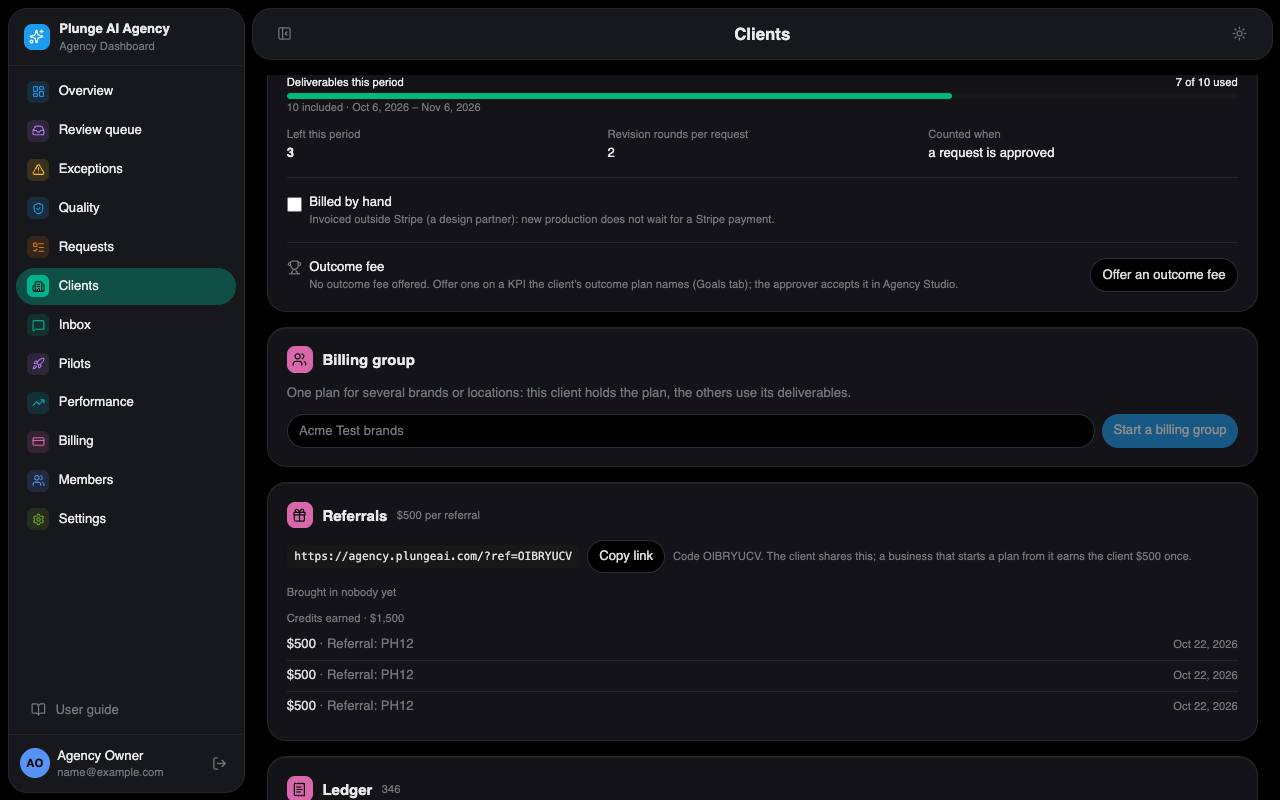
*Dashboard › one client › Plan: the active plan's burn meter, the outcome fee offer, the billing group and the referrals tile.*
### Settings
admin edits the agency settings: the quote limit ($25 by default), the margin floor (65%), the cost rates used in quotes, the revision fee, the hosting bill and Stripe fee estimate, the weekly digest schedule, the operations Slack webhook, the packages, and three switches for the client side and the team: **Clients watch production live** (off by default), the **reviewer load alert** (a reviewer at or over this share of their weekly hours, 70% by default, is named in Monday's capacity mail to the owner) and the **quarterly briefing opening** (the Markdown every briefing starts with).
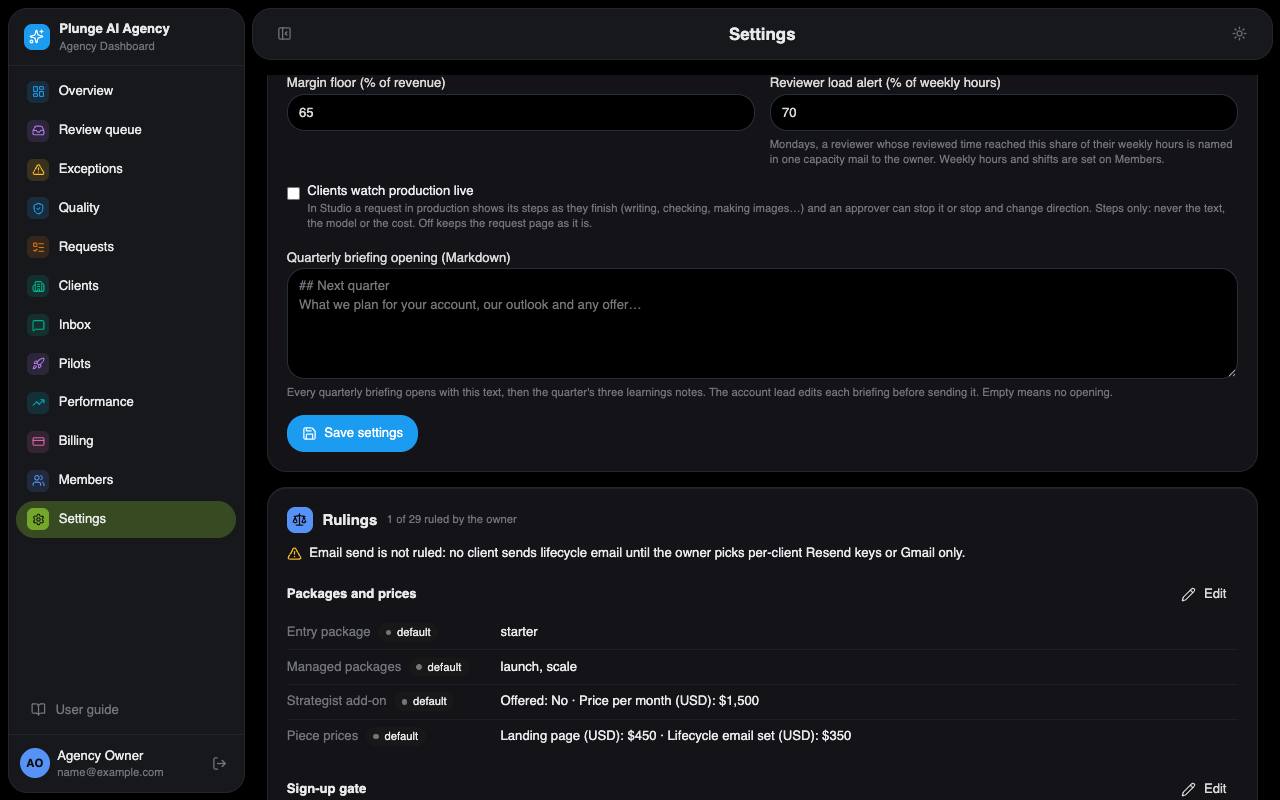
*Dashboard › Settings › Defaults: the margin floor, the reviewer load alert, the live view switch and the briefing opening.*
#### Rulings
The owner's decisions about how the agency runs, stored as data. Each shows "ruled" or "default"; only the owner edits them, group by group, and the page warns about rulings that conflict. The groups and their defaults:
| Group | Holds (default until ruled) |
| --- | --- |
| Packages and prices | Entry package Starter; managed Launch and Scale; strategist add-on off; per-piece prices $450 a landing page, $350 an email set. |
| Sign-up gate | Fit rule ($1,500 a month of media, a Google Ads account, regions US, CA, GB, EU, AU); 3 client seats; no booking link; activation without a Google connection. |
| Rates and billing | Human time $1.50 a minute; open book per client; per-piece charge on approval; referral credit offered, $500 per referred business. |
| Samples and evals | Free samples: 1 per domain per 30 days, 10 a day, $2.00 each; eval spend $25 a month. |
| Autonomy | The thresholds for work that would skip a person, the reasons that never may (spend increase, new audience, people, product, new claim, client restriction), regulated categories and enabled industry packs. Every piece still goes through internal review today. |
| Time rules | Deemed acceptance after 48 hours with reminders at 24 and 44; the stop rule (2× target cost over 7 days, on by default); lead reply time 24 hours. |
| Ideal customer and channels | DTC brands at $5,000–$15,000 a month of media; channel order; lead hours per deliverable (3: above it, hire or contract a senior lead). |
| Turnaround | First and revision rounds: ad creative 72 / 24 h, landing page 72 / 24 h, lifecycle email 48 / 24 h, custom 120 / 48 h; the missed-round remedy; rush fee $150. |
| Email send | Not ruled: no client email is sent until it is. |
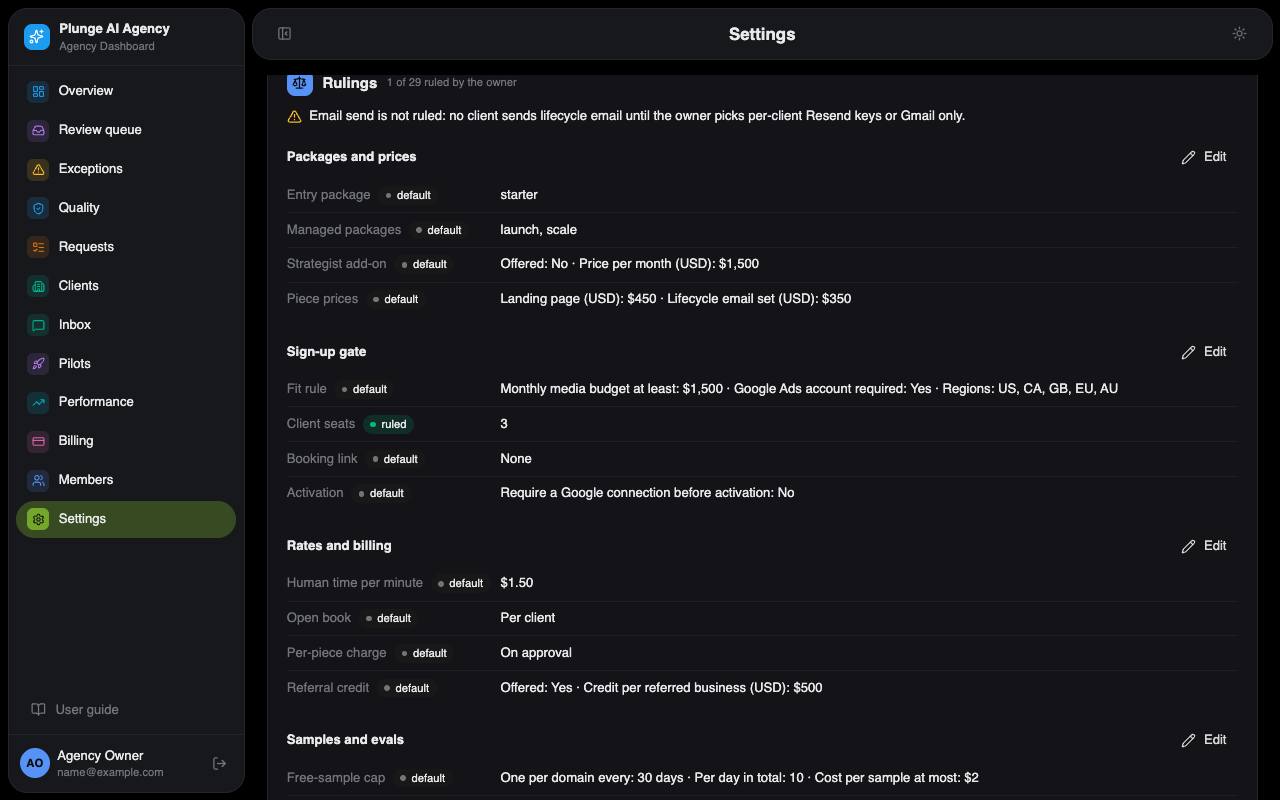
*Dashboard › Settings: the Rulings, each marked ruled or default.*
#### Owner items
Admins see the owner's open items (account, Google Ads access, Stripe, email send, legal reviews and others), each pending, done or abandoned with a note, a date and who recorded it. Only the owner records one. A note that looks like a key is refused.
#### Mail test and outbox
Every notification is queued in the outbox and sent by one scheduled job. The mail test admin sends to an agency member's own mailbox, the only proof that mail is delivered. The outbox list shows no payloads; only the owner opens one, and that read is recorded. Nothing is mailed to reserved test domains.
### When something stops
The pipeline opens one exception per cause and subject, so a repeated refusal does not pile up rows. Retry is offered where the request can re-enter the pipeline; for the others, act on the request and dismiss the row, or let the fix resolve it.
| Exception | What to do |
| --- | --- |
| Quote above the limit | Open the request and produce it with the quote confirmed, or cancel it. |
| Plan not paid | Get the client's plan paid or activated (Billing), then retry. |
| No units left | Wait for the next period, raise the plan's units or let in-flight work finish, then retry. |
| Client not active | Activate the client with its production workflow, then retry. |
| Brief section missing | The brief lacks its landing-page CTA or its email section: cancel the request and create it again with that section. |
| No approved brand | Approve a brand version for the client, then retry. |
| Run did not start | The platform refused the start: retry, or open the request. |
| Run failed twice | The run and its retry both failed: read the runs on the request, then retry or cancel it. |
| QA failed | Open the request and request changes or put it back in the queue. |
| No client approver | Invite an approver on the client page, then retry the send. |
| Validators split | Two checks of one rule disagreed and the tie-break did not settle it: decide the concept in the review queue. |
| Repair failed QA | A concept failed QA and its automatic repair failed again: open the request and request changes or put it back in the queue. |
| Image check unavailable | The visual check could not run on an image or clip: look at it yourself in the review queue before it goes on. |
| Regulated industry | Check the brand and its claims against that industry's rules, then approve the version on the client's Brand tab. |
| Client needs a decision | The account bot could not answer and handed the question to the lead: reply in the Inbox. |
| Client reply overdue | A client is waiting past the stated reply time: reply in the Inbox now. |
| Campaign paused on budget | The spend guard paused a campaign at the monthly cap or target cost. The client resumes it from their goals page; if the pause itself failed, pause the campaign by hand. |
| No industry pack enabled | Have the owner enable the pack (Settings › Rulings) or change the client's category, then retry. |
| Brand needs a review | Review the librarian's proposals on the Brand tab, apply or reject them, or re-ingest the brand, then dismiss this. |
| Monthly plan not signed | The month's strategy memo is unsigned on the 5th: the account lead reviews, edits and signs it on the Strategy tab; signing resolves this. |
| Planned work could not start | A due rhythm started nothing: the client's plan is not active or its pieces for the period are used up. Fix the plan or wait for the next period; the next cycle that runs resolves this. The client was told. |
| Quarterly briefing drafted | The quarter's briefing is drafted. Read it on the client page (Strategy tab), edit it, then send it; the send resolves this. |
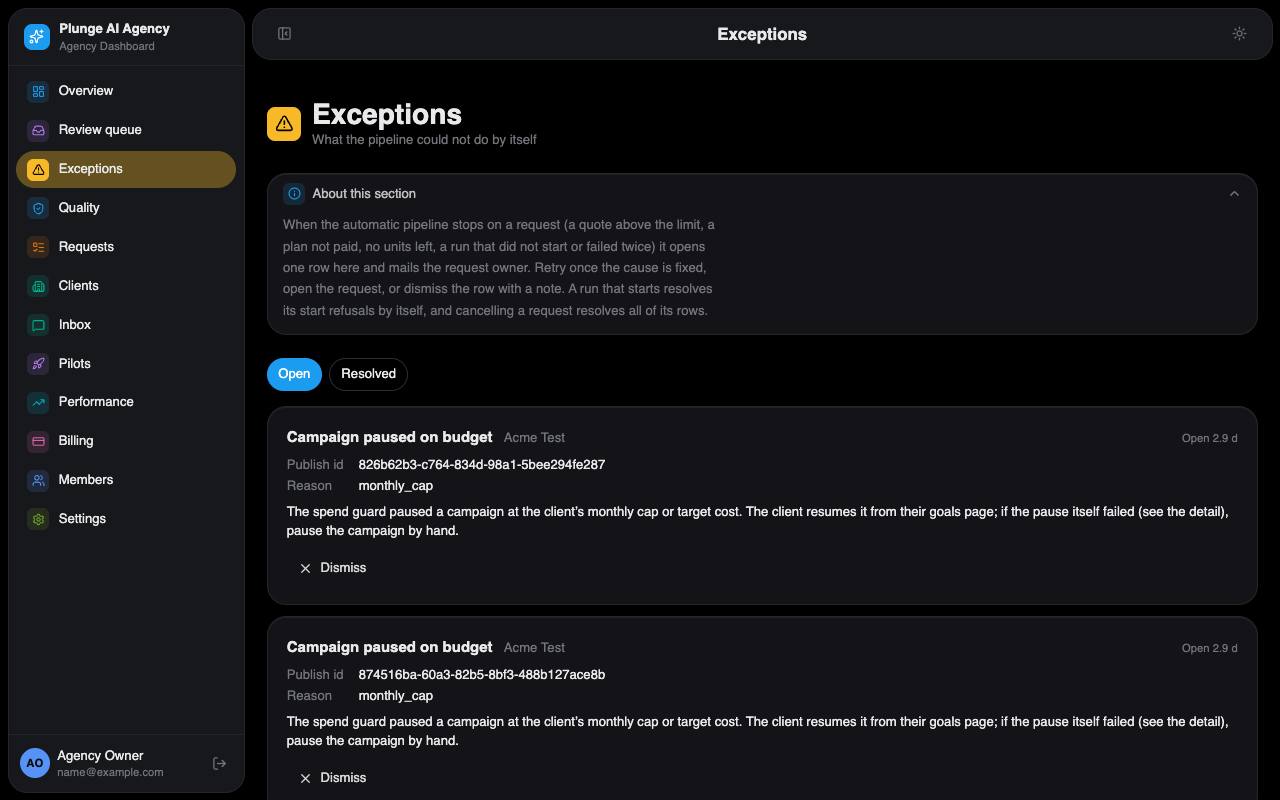
*Dashboard › Exceptions: open rows with what to do and the three actions.*
#### QA holds
A concept is held, not failed, when a rule's votes split and the tie-break could not run, or an image could not be checked visually. It goes to internal review with the hold named; you decide it like any other piece.
#### A failed run
A production run that fails puts the request back in Queued and is retried once automatically. A second failure opens "Run failed twice", and only then is a per-piece fee credited back.
#### Billing holds
A plan past due for more than 3 days, or unpaid, holds new production. The client's approvers and the owner get one mail per stretch, and Agency Studio shows the hold with "Update card". Revisions of work already produced are not held.
### Scheduled jobs
The platform scheduler runs the agency's jobs; the Dashboard has no clock of its own. **Agency jobs** runs every job below, in this order, every 5 minutes. **Agency run reconcile** also runs `reconcile-runs` every minute. Each job decides for itself whether this pass has work; one failing job never stops the next.
| Job | What it does |
| --- | --- |
| connection-health | Re-checks each client's connections every 6 hours; mails the owner when a required one drops. |
| reconcile-runs | Finishes platform runs: production into deliverables, publish, measuring, librarian, strategy and the rest. |
| qa-settle | Checks and decides the pieces that are still "Checking", including video clips. |
| evals-run | Runs up to 6 golden cases of the open eval run, inside the eval budget. |
| brand-activate | For sign-up clients: starts the ingest, the sample card and sample, approves the brand the client approved, activates. |
| backfill-costs | Copies each run's platform cost and books one cost line per priced run. |
| brand-kit-describe | Describes up to 3 uploaded brand-kit images a pass. |
| autonomy-review | Daily per client and service line: tells the lead when a line qualifies for automatic review (only the owner promotes) and demotes a promoted line when the checks changed or its numbers fell. |
| cogs-allocate | On the first UTC day of a month, splits last month's hosting over the clients by runs. |
| lead-agent | Researches up to 3 eligible leads and drafts a reply for the owner; never mails a prospect. |
| lead-hours-weekly | Mondays: human minutes per deliverable over 28 days against the ruled budget; mails the owner when over. |
| lockup-auto | Renders the three framed versions of a client-approved image ad and sends them to the client. |
| publish-approved | Publishes a piece the client approved with its launch plan, using the client's campaign settings; a refusal opens an exception and, when the client can fix it, a notice. |
| standing-approvals | Approves, after the hold window, the pieces a client's standing approval covers, and switches on the paused campaigns it covers within the daily ceiling. |
| brand-learn-sync | Writes learned lines stored by Agency Studio and magic links onto the brand card. |
| measure-daily | Once a day per publish: yesterday's Google Ads and GA4 rows. |
| spend-guard | Applies the stop rules: pauses at the monthly cap or above the target cost; performs the client's resume requests. |
| account-watch | Once a client-local day per client with a live Google Ads publish: reads the account, takes over a status changed in Google Ads, pauses over the cap, and opens one exception per finding. |
| weekly-winners | Mondays: the week's winning creatives become learned lines; proposes up to two requests (iterate a winner, replace a laggard). |
| brand-librarian | Mondays per client: proposes Do and Don't edits from the learned lines, comments and edits. |
| always-on | Starts each due rhythm's planned work (up to 20 a pass): accepts open proposals of the line first, else makes the request from the standing brief; opens "Planned work could not start" when nothing can. |
| strategy-memo | Client-local day 1: drafts the month's strategy memo for the lead; from day 5 an unsigned one opens an exception. |
| margin-weekly | Weekly per client: this month's margin under the floor mails the owner. |
| metrics-weekly | Mondays: alerts the owner when human minutes grow in step with revenue. |
| reviewer-capacity | Mondays, once a week: last week's reviewed time against each reviewer's weekly hours; one mail to the owner naming those at or over the alert threshold. |
| outcome-checkpoint | A week before a client's KPI checkpoint, mails the approvers and the lead. |
| weekly-digest | The client's weekly digest on its weekday and hour, by mail and Slack. |
| monthly-learnings | From the month's first Monday at the digest hour, per active client: writes last month's learnings note and mails it to those with the switch on. |
| quarterly-briefing | The first Monday of January, April, July and October: drafts the quarter's briefing for the lead and opens "Quarterly briefing drafted"; never sends it. |
| renewal-reminders | A reminder 7 days before an active plan renews. |
| billing-holds | Tells the approvers and the owner once when a plan is held for payment. |
| charge-units | Charges each due per-piece request to the client's saved card. |
| outcome-fees | From the 1st of the client-local month: invoices last month's confirmed units of an accepted outcome option, up to the cap; a month with none is skipped. |
| pipeline-sweep | Takes on any client brief still in Intake 5 minutes after it was created. |
| escalate-sla | Books missed-round remedies, then warns and escalates turnaround breaches to the account lead. |
| client-notices | Review reminders, deemed acceptance, issue, published, turnaround-risk and budget notices, the daily note. |
| exit-revoke | For a cancelled plan: an exit warning a week ahead, then the client's connections are revoked. |
| lead-response | Escalates a client thread past its reply-due time to the lead. |
| flush-outbox | Sends what the outbox holds. The only sender; a failed send backs off and fails on the fifth attempt. |
admin `POST /api/jobs/run {"job": ""}` runs one job now (add `"force": true` to skip its own schedule, `"clientId"` to narrow it). Weekly jobs keep their once-a-week guard even when forced.
### Data, export, erase
The agency keeps its own data, apart from the rest of the platform: three D1 databases (`agency-db` for clients, brands, requests, deliverables and reviews; `agency-billing` for plans and the ledger; `agency-events` for the timeline, the outbox and performance rows), a KV cache of read-fast copies and an R2 bucket for images, pages and files, all under the client's own prefix.
**Export**
admin "Download client data" on the client page: one JSON file with the brand, claims, requests, client-visible deliverables, decisions, timeline and billing lines. A ZIP with the files is offered too. The client's approver downloads the same from Agency Studio. Every export is recorded.
**Erase**
owner Read the residue first, then erase with the client's slug as confirmation. It cancels the Stripe subscription, deletes the client's connections, saved workflows and brand card, then every row of the client in the three databases, its files and cache keys. If a platform step refuses, nothing is deleted and you can repeat it. Stripe's own customer and invoices and the platform's run records are kept.
**Lead erase**
owner A lead that never converted is erased with its email as confirmation.
**Re-home**
owner Moves the agency's workflows, brand cards and bot onto another platform account, confirmed with the agency's slug. Repeat it if a step is refused.
## How it works
The system underneath both apps: where things run, how a request moves, what the pipeline and the QA gate do on their own, how the brand learns, where the money goes and what runs on the clock.
### The system map
Plunge AI Agency is three web apps on Cloudflare. They keep the agency's data in their own databases and use the Ocean platform for everything that thinks or generates: workflow runs, models, run outputs, brand cards and the clock. This is the only place in this guide that names the internal services.
*Diagram 1. Three apps, the agency's own data, and the platform services they call. The dashed line is the scheduler calling the Dashboard's jobs.* The public site forwards the start form to the Dashboard. Agency Studio and the Dashboard both read and write the agency's three D1 databases, the KV cache and the R2 bucket, and call the Ocean platform: auth-core, Ocean Studio runs, the One API, SharedMemory, the registry and the scheduler, which calls the Dashboard's jobs.
| Surface | Who uses it | How you get in |
| --- | --- | --- |
| Public site | Anyone | No login. Packages, the start form and the policy pages. |
| Agency Studio | Client users (approvers and viewers); agency members can open their clients' workspaces | A Plunge AI account, after an invite. Magic links open one decision without a login. |
| Dashboard | The agency team | A Plunge AI account under an email an owner or admin added. |
Every run is started as the agency's platform account, or, where the client's own connections are needed, on behalf of that client, so a client's credentials stay under that client. Notices by mail and Slack go through one outbox, and only the Dashboard's flush job sends from it.
### The request lifecycle
A request has twelve statuses. The arrows are the only moves the code allows; anything else is refused. The colour of an arrow says who usually makes the move.
*Diagram 2. Every status and every allowed move. Delivered and Cancelled are final.* Proposed goes to Intake or Cancelled. Intake to Queued or Cancelled. Queued to In production or Cancelled. In production to QA failed, Internal review or back to Queued. QA failed to Queued or Cancelled. Internal review to Client review, Revision, Queued, or Cancelled for a free sample only. Client review to Approved, Revision or Cancelled. Revision to Queued. Approved to Published or Delivered. Published to Delivered. Delivered and Cancelled are final.
| Move | Who | When |
| --- | --- | --- |
| Proposed → Intake / Cancelled | Client approver | Accepts or declines a request the weekly results job proposed. The job also expires it after 14 days, and the team may withdraw it. |
| Intake → Queued | Pipeline | A client's brief is taken on at once; a sweep picks up any still in Intake after 5 minutes. A request the team creates starts in Queued. |
| Queued → In production | Pipeline or team | The pipeline starts it when every check passes; a strategist can press Produce. |
| In production → Queued | Pipeline | The run failed. It is retried once automatically. |
| In production → Internal review / QA failed | Pipeline | The QA gate settled the version: something passed or was held (Internal review), or nothing passed (QA failed). |
| QA failed → Queued / Cancelled | Team | Re-queue with a reason, or cancel. |
| Internal review → Client review | Team (reviewer) | A reviewer approves. The pipeline sends the version to the approvers the moment every piece of it is decided. |
| Internal review → Revision / Queued | Team | Send back for changes, or re-queue with a reason. |
| Client review → Approved / Revision / Cancelled | Client approver | Approve, request changes, or decline every piece. |
| Revision → Queued | Pipeline | The re-run with the steer starts, after a reviewer's re-run or the client's request for changes. |
| Approved → Published | Team (admin) | Published to Google Ads. |
| Approved → Delivered | Pipeline | Closed once the client approved every approved piece and nothing is waiting to publish. |
| Published → Delivered | Team (strategist) | Closed from the request page once published work is done; the pipeline does not close published requests by itself. |
A free sample makes one extra move: from Internal review it closes as Cancelled once the prospect has decided each piece. Work never makes that move.
### Production
The pipeline moves a request from brief to internal review without anyone pressing a button. When it cannot go on by itself, it stops and opens an exception (see [When something stops](#when-something-stops)).
*Diagram 3. An ad set from brief to client review. Landing pages and lifecycle email follow the same shape with one page or 1–4 email variants and no images.* Brief, quote, start the client's workflow, concepts, concepts as data, validators with two copies per rule, judge, images per format, a new version whose pieces are being checked, the QA settle, internal review by a person, and client review.
1. **Brief.** A client's brief enters Intake and the pipeline takes it on at once. It names an owner (the client's account lead when there is one) and moves it to Queued.
2. **Quote.** The pipeline prices the run from the agency's rates. The quote is the agency's internal estimate; the client never sees it. Above the agency's maximum quote (default $25) the pipeline stops and a strategist confirms on the request page.
3. **Checks.** Before any run: an active, paid plan with a unit left, an activated client with a saved workflow and an approved brand, consents for any named person, a domain pack for a regulated industry. A refusal opens an exception.
4. **The run.** The client's own workflow runs on the platform with the brand card attached. It writes 3 to 6 concepts, turns them into data, has every QA rule judged twice by identical copies, writes a judge's summary that never decides anything, and renders one image per concept for each format the brief asked for.
5. **A new version.** Every piece lands as “Checking” and the request stays In production. Clients do not see pieces until they pass.
6. **QA settle.** The scheduled QA job decides each concept (see [The QA gate](#the-qa-gate)), up to four versions per pass.
7. **Internal review.** If anything passed or was held for a person, the request goes to the Review queue; if nothing passed, to QA failed.
8. **Send.** When a reviewer has decided every piece of the version, the version goes to the client's approvers at once, each with their own magic links.
If a run fails, the request goes back to Queued and is retried once. If the retry fails as well, an exception opens, and a per-piece fee is credited back.
### The QA gate
The automatic QA gate checks every concept before a person sees it. It never sends work to a client by itself: a person decides every piece the gate passed or held, and can dispute or re-queue anything it failed.
| Template | Rules (each judged by two identical copies) |
| --- | --- |
| Ad creative | Brand, claims, ad policy, brief |
| Landing page | Brand, claims, accessibility and structure |
| Lifecycle email | Brand, claims, CAN-SPAM |
| Video clip | Brand, policy, plus picture checks at 1, 4 and 7 seconds; when that check cannot run, a person watches the clip |
*Diagram 4. How the gate decides each concept. Held concepts go to the Review queue; failed ones are listed on the request page, where a reviewer can dispute them.* Pieces being checked go through deterministic checks, rule votes with two copies each, and visual QA of each image. A one to one split gets a tie-break copy. Each concept is then decided: fail first, then hold, else pass. A pass goes to internal review, a hold to a person, and failing concepts of an ad set get one free repair that is checked again. Each piece also gets a shadow verdict measured on the Quality page.
- **Fixed checks** run without a model: the block list (banned words, competitor names, required legal lines on pages and emails), numbers no approved claim covers, the client's website link, image facts, and the AI restrictions the client set.
- **The vote.** Two agreeing copies decide a rule. A 1–1 split gets one tie-break copy; if that cannot run, the concept is held for a person.
- **Visual QA** looks at each image for artifacts, text or logos inside the image, people, and a product shown wrongly. A person in an image is flagged to the reviewer. If the check cannot run after three tries, the concept is held.
- **One repair.** When concepts of an ad set fail, the gate starts one repair run for them with the reasons as a steer. It is never billed. If a repaired concept fails again, an exception opens.
- **Shadow verdict.** Each piece also gets a “would pass / would fail” verdict that the Quality page compares with the people's decisions.
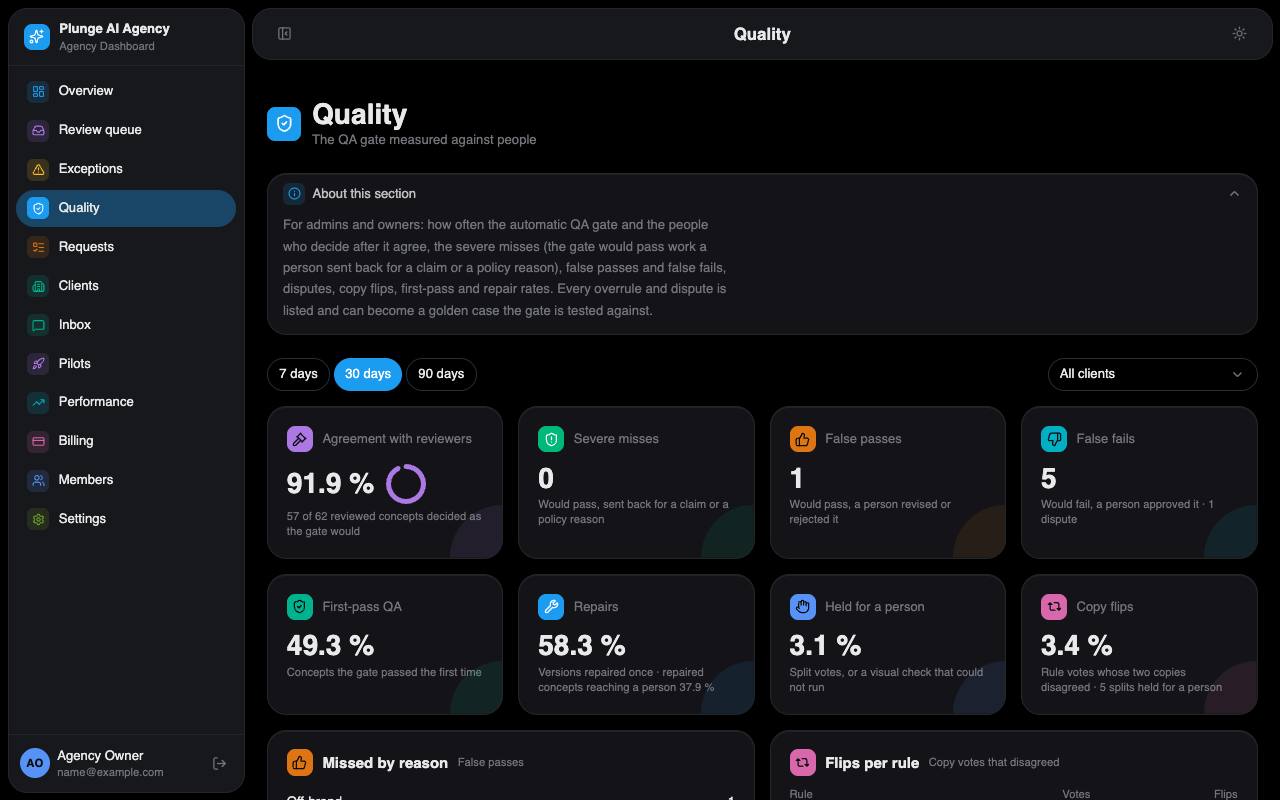
*Dashboard › Quality: agreement with people, severe misses, the golden set and eval runs.*
The Quality page (admin) shows how often the gate agreed with people, and the *severe misses*: pieces the gate would have passed that a person sent back or rejected for a claim or a policy reason. An overruled or disputed piece can be added to the golden set. Eval runs replay the golden cases against the current rules; a client's workflows are saved only when every one of its templates passed at least 90% per rule. This is the evals gate. Only the owner can skip it, and must give a reason. Evals spend is capped by a ruling (default $25 a month).
### The brand brain
The brand is a versioned document. The active version is written to a private brand card on the platform, and every production run reads that card. Decisions keep teaching it.
*Diagram 5. From the website to a living brand. Restore makes a draft that is approved like any other.* The client's website is read by an ingest run into a draft. The client confirms or fixes each section, the draft becomes the active version written to the brand card, and every run reads the card. Each decision adds a learned line, the weekly librarian proposes edits, and applying them makes a new approved version. An archived version can be restored as a new draft.
1. **Ingest.** A run reads the client's website and writes a draft: the brand sections and a list of proposed claims.
2. **Confirm or fix.** The client's approver checks each section in Agency Studio. Sections the draft is unsure of must be confirmed, and every proposed claim decided, before the brand can be approved.
3. **Activate.** The approved draft becomes the active version and is written to the client's private brand card. Only the agency's runs can use it.
4. **Learn.** Every review decision, weekly winner, edit or manual note adds one dated learned line, which is written to the card too.
5. **Librarian.** Once a week, when there are at least three new signals, the librarian proposes up to eight edits to the Do and Don't lists, each tied to the signals behind it.
6. **Apply or restore.** A strategist applies a set, which makes a new approved version, or rejects it with a reason. Any archived version can be restored as a new draft.
A brand older than 180 days, or with more than 40 learned lines, is flagged as stale and opens a “Brand needs a review” exception.
### Money
Every amount the client pays, gets back or costs the agency is one line in the client's ledger. Stripe runs in test mode today.
*Diagram 6. Where money comes from and goes. Stripe runs in test mode today.* Packages set in Settings become a draft plan, then a Stripe checkout in test mode. A monthly retainer is invoiced per month; a per-piece plan saves a card and charges each piece. Change orders, credits and refunds are ledger lines too. The ledger's revenue minus the cost of goods (model, hosting, payment fees and human time) is the margin.
**Retainer units**
A unit is used when its request first reaches Approved. A request the client declined uses none.
**Per-piece charges**
One invoice per request at the price shown when it was sent, charged to the saved card at approval or at submit, as the agency's ruling says. A declined charge waits for the owner to retry it.
**Change orders**
A revision round past the plan's included rounds (default $150) or a rush. The client accepts it first; then one invoice line is raised, and for a revision round the re-run starts.
**Credits**
A per-piece fee comes back when a run fails with no retry, or a turnaround round is missed. On a monthly plan, a missed round means the piece does not count against your units.
**Refunds**
The owner refunds a paid ledger line from the Dashboard. A refund made directly in Stripe is not recorded in the ledger.
**Cost of goods**
Four lines: model cost per run, hosting split over the clients by runs, payment fees, and human minutes at the ruled rate. Free samples and lead research are booked as acquisition cost, outside margin.
**Margin**
Revenue minus the four cost lines, per client and month. Below the floor (default 65%) the owner gets a weekly mail.
### The clock
The platform scheduler drives everything that happens without a click. The full list is in [Scheduled jobs](#scheduled-jobs).
*Diagram 7. Two scheduler entries drive every job. Each job decides for itself whether a pass has work.* A fifteen-minute timeline. Every minute the run reconcile finishes platform runs; every five minutes the full pass runs every agency job in order. Below, the jobs that act every pass, the daily ones and the weekly or monthly ones.
Each job is safe to run twice: guards keep a mail, a charge or a run from happening twice when passes overlap. One failing job never stops the next one. Times marked “local” are in the client's own timezone.
### Who sees what
The server checks every call against the caller's role, so a hidden button is also a refused request.
| Surface or action | Visitor | Client viewer | Client approver | Agency viewer | Reviewer | Strategist | Admin | Owner |
| --- | --- | --- | --- | --- | --- | --- | --- | --- |
| Public site and policy pages | Yes | Yes | Yes | Yes | Yes | Yes | Yes | Yes |
| Read a client workspace in Agency Studio | — | Yes | Yes | Yes | Yes | Yes | Yes | Yes |
| Decide work as the client; edit brand, goals, trust; pay | — | — | Yes | — | — | — | Approve on behalf, with a reason | Approve on behalf, with a reason |
| Planned work, the client team, case-study consent, accept an outcome option | — | — | Yes | — | — | — | — | — |
| Share a piece or a report by link | — | — | Yes | — | Yes | Yes | Yes | Yes |
| Stop or steer a running production | — | — | When the live view is on | — | — | Yes | Yes | Yes |
| Magic link (one decision) | — | — | Yes | — | — | — | — | — |
| Read the Dashboard | — | — | — | Yes | Yes | Yes | Yes | Yes |
| Decide deliverables, reply in the Inbox | — | — | — | — | Yes | Yes | Yes | Yes |
| Requests, quotes, claims, brand operations | — | — | — | — | — | Yes | Yes | Yes |
| Activate clients, plans, publish, Members, Settings, Quality, outcome fee offers, billing groups, rosters | — | — | — | — | — | — | Yes | Yes |
| Rulings, refunds, erase, re-home, skip evals, outbox payloads, case studies | — | — | — | — | — | — | — | Yes |
| QA details, quotes, costs, internal notes | — | — | — | Yes | Yes | Yes | Yes | Yes |
Clients see their own timeline with internal steps left out. An operator's internal “request changes” never reaches the client, and costs appear only when the agency turned on open book for that client.
### Glossary
**Request**
One piece of ordered work, from brief to delivery. It moves through the statuses in [the lifecycle](#the-request-lifecycle).
**Brief**
What is asked for: objective, channels, formats, must say, must not say, call to action and audience.
**Unit**
What a plan counts. One brief is one unit: an ad set (3 to 6 concepts, each with its copy and one image per format asked for), a landing page, or an email set (1 to 4 emails), each with 2 revision rounds.
**Deliverable**
One piece you can review: copy, an image ad, a video clip, a landing page or an email.
**Version**
One production round of a request. A revision makes the next version.
**Concept**
One idea in an ad set: its hook, its copy and its visual direction.
**Lane**
A named output of a platform run, read by the Dashboard when the run ends.
**Run**
One execution of a workflow on the platform (production, a QA check, an ingest, the librarian…), recorded with its cost.
**Exception**
An item in the one queue for what the pipeline cannot do by itself, with what to do about it.
**Hold**
A concept the QA gate passes to a person instead of deciding it: a split vote, or a visual check that could not run.
**Learned line**
One dated line on the brand, from a decision, a weekly winner, an edit, a comment or a manual note.
**Librarian**
The weekly run that turns learned lines, comments and edits into proposed Do and Don't edits.
**Claim**
A factual statement the client approved. Copy may state only approved claims.
**Block list**
Banned words, competitor names and required legal lines, enforced by the fixed checks.
**Envelope**
The client's spending envelope: monthly cap, target cost per result, order value or margin, and the stop rules.
**Change order**
A priced extra the client accepts first: a revision round beyond the plan, or a rush.
**Magic link**
A review link by mail for one decision on one piece. No login, single use, and it expires.
**Account lead**
The agency member who looks after a client, answers messages and signs the monthly strategy memo.
**Sample**
Three free image concepts made for a new sign-up client from its draft brand. Never billed, counted against a plan or published.
**Pilot**
A design-partner client, flagged so the Pilots report can follow its results.
**Rhythm**
One line of planned work: every so many days, or before a date, with a standing brief and the pieces each cycle starts.
**Standing approval**
The client approver's permission, recorded once, for the agency to start a service line's work on their behalf. Turning a rhythm on records one; turning the last rhythm of the line off withdraws it.
**Share link**
A link for one approved or published piece or one performance report, 1 to 30 days, no sign-in. The token exists only when it is made; the agency reads which links exist, never the link itself.
**Case study**
A public write-up of a client's result, with the client's consent, stating only measured numbers and how they were measured.
**Outcome fee**
A fee per confirmed lead or sale, up to a monthly cap, offered on a plan and accepted by the client's approver; invoiced monthly from GA4-confirmed counts.
**Learnings note**
The monthly note on a client's winners, revisions, tests and what is next, written from stored results. Three of them open a quarterly briefing.
**Roster**
The reviewers' shifts by time zone. Active once two members have shifts; then each request entering internal review is assigned to the reviewer on shift with the fewest.
**Billing group**
Several clients billed on one client's plan: one owner client, member clients that read the plan as "Billed to".
[Back to Plunge AI Agency](https://agency.plungeai.com/)