Ocean Code
Work modes
Who decides how agents work together on your prompt — the model, Jev, or you with one of seven diagrams. Each diagram is one small file the pager draws from and the engine runs from.
A work mode decides how agents work together on your prompt. There are three answers to "who decides?":
- The model (Model, the default): the model decides on its own whether to work alone, call sub-agents or run a workflow. Every tool is offered, nothing is added to the prompt, there are no new limits and no badge.
- Jev (Auto): once per prompt, Jev picks one of the modes below; when it cannot, simple rules pick.
- You: one of seven diagrams, Solo, Delegate, Pair, Pipeline, Orchestrate, Goal or Race.
Nothing needs setting up. Until you pick another mode, nothing changes.
Picking a mode
F4 or /mode opens the picker: the modes on the left, the highlighted one's description, picture and cost on the right. Model is first and tagged default; your own diagrams follow a divider.
| Key | What it does |
|---|---|
↑ / ↓ | Move; the picture follows. |
Enter | Use this mode for this session. |
d | Make it the current agent's default (written to your oceancode.json). |
e | Copy a built-in to .oceancode/modes/<id>-copy.jsonc to edit. |
Esc | Close without a change. |
Typed, /mode <id> sets the session's mode and /mode default clears it. The status bar's badge names the mode in force; under Auto it also says who picked (auto → goal · Jev 0.82, auto → solo · rules: short task).
The diagram language
Every diagram, built-in or custom, is made of six blocks and nothing else. The green pill is you.
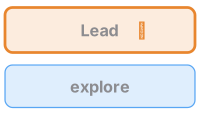
A role (lead · research · code · review · judge) with a model and effort. ✎ means it may change files; without ✎ it is read-only, enforced.
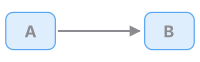
A ──▶ B: B starts from A's result; A is finished.
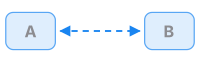
A ◀─▶ B: A asks B, B answers with evidence, A carries on.
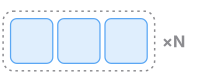
×N: N agents at once, results gathered; never more than the at-once limit.
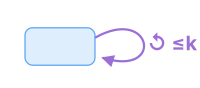
↺ ≤k: repeat until the check passes, at most k passes.

◇: a check — tests, a judge, a sceptic panel, your approval, your pick.
Two rules hold for every diagram, custom ones included. One writer per copy of the project: two ✎ agents run at once only if each has its own copy. Every loop has a limit: every ↺ carries its k, and every ×N stays within the at-once limit.
The modes
Model, Solo, Delegate, Pair and Orchestrate are lead modes: your prompt is an ordinary turn, and the mode shapes what the lead may do. Pipeline, Goal and Race are script modes: each prompt becomes the task of a workflow run; the turn answers at once and the result arrives later in the session.
Model — the model decides
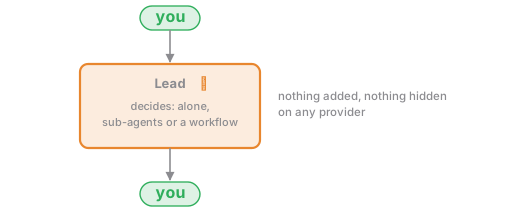
- What happens. Ocean Code as it is without a mode: every tool, any sub-agent type, no prompt block, no limit of its own (sub-agents nest four deep). Only the numbers you set in
subagent.max_*apply. - Pick it for. Everything, until you want a shape. First in the picker, tagged
default. - Cost. Varies with the task.
Solo — one agent does everything
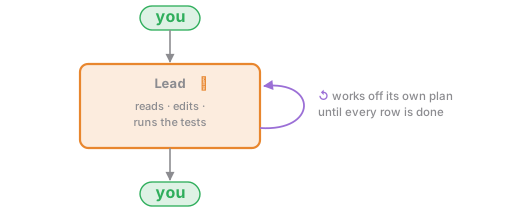
- What happens. One model, one context. The plan, the work-off and the no-progress guards keep it going; no sub-agents exist in this mode.
- Pick it for. Small or tightly connected changes, and strong models. Models keep getting better, so this is right for more and more work.
- Cost. 1×, the reference.
Delegate — a lead with read-only helpers
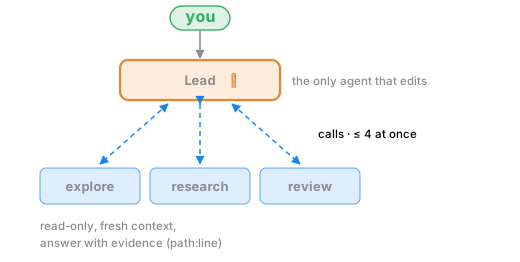
- What happens. The lead does the work and sends side questions to helpers: where is X handled, what do the docs say, check this diff. Helpers return evidence, not conclusions.
- Pick it for. Everyday Build and Ask work.
- Cost. About 1.2–2×.
Pair — a thinker and a builder
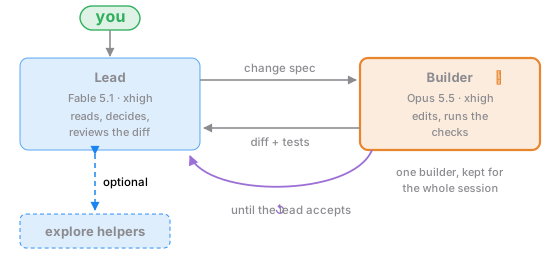
- What happens. The lead never edits. It writes a change spec (what, which files, how to check it); the builder edits, runs the checks and reports the diff and the test output; the lead reads the diff, then accepts or sends corrections. The builder keeps its context between hand-offs.
- Pick it for. A strong thinker with a faster, cheaper coder.
- Cost. About 1.3–2×.
Pipeline — stages in order
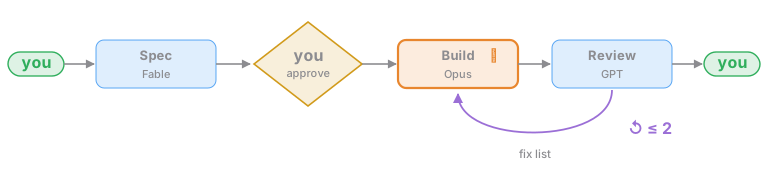
- What happens. Stages run in order, each its own agent and model. Nothing is built until you approve the spec; review findings go back to Build at most twice.
- Pick it for. Features where the spec should be agreed first; the automatic version of Plan →
Shift+Tab→ Build. - Cost. About 1.5–3×.
Orchestrate — the lead writes a workflow
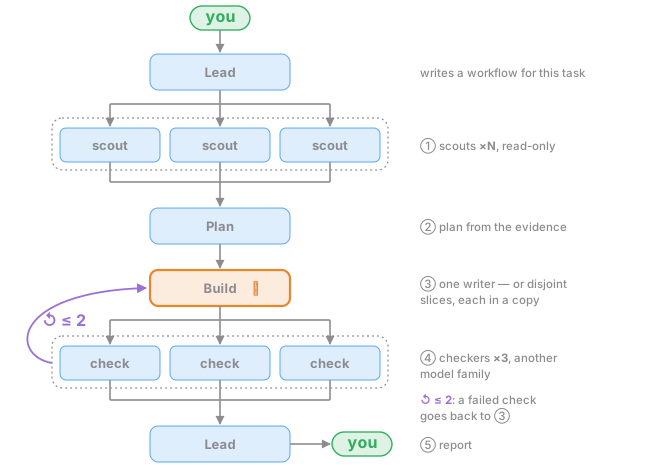
- What happens. For a substantive task the lead writes a workflow shaped like this and adjusted to the task: scouts, a plan from the evidence, one writer (or disjoint slices, each in its own copy), checkers from another model family. Short answers stay plain turns.
- Pick it for. Specs, research, architecture and large changes with several parts.
- Cost. About 3–15×.
Goal — until proven done
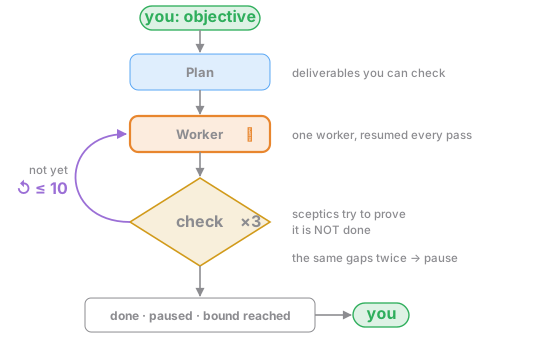
- What happens. The goal workflow: one resumed worker, three sceptics by default, at most ten passes, a pause when the same gaps repeat.
- Pick it for. Long tasks with a clear finish line: "make the suite green", "port this module". Start one with
/goal <objective>. - Cost. About 5–20×.
Race — attempts you choose between
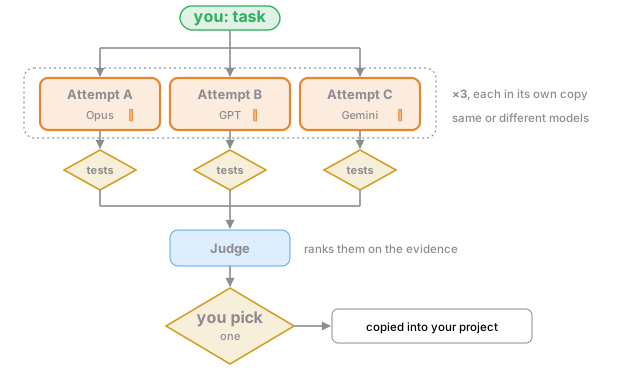
- What happens. Each attempt runs in its own local git clone of the project under Ocean Code's data directory, never inside the project; the copy carries your uncommitted changes. Tests run in each copy, the judge ranks the attempts on the evidence, you pick one, and only then does the winner come back as one patch applied to your working tree, nothing staged.
- Pick it for. Important changes with tests, or comparing models on your own code.
- Cost. About N× plus the judge.
Auto — Jev picks

- What happens. Once per prompt, Jev answers one typed question, which of the modes that can run here fits the task, and its pick runs when its confidence is at least 0.6. With Jev off, no TypeSafe key, an error or a time-out, the rules pick: three or more file paths or list lines → Orchestrate; a finish line (
until,tests pass) → Goal; one short line that is not a question → Solo; anything else → Model. - Pick it for. When you want a shape per task without choosing each time. The badge says who picked (
auto → goal · Jev 0.82);/modeoverrides it. See Jev decisions. - Cost. The pick's.
Which diagram
| Question | Diagram |
|---|---|
| Is the change small, or are its edits tightly connected? | Solo |
| Does the agent need to look around a lot first? | Delegate |
| A strong thinker and a cheaper, faster coder? | Pair |
| Agree a spec first, then build and review? | Pipeline |
| Big or wide: research, a spec, many parts? | Orchestrate |
| A long task with a check that says "done"? | Goal |
| An important change, and you want options to choose from? | Race |
Seven is the upper end of a list people read: Amp found that 69 % of users never leave the default, and Cursor removed custom modes in 2.1. Left out, with reasons: agent swarms that message each other (measured failure rates of 41–87 %), debate (loses to plain sampling at equal compute) and deep hierarchies (Orchestrate at depth 2, not a new shape).
Limits
A mode bounds sub-agents three ways: how many run at once in the whole tree, how many one turn may start, and how deep they nest. Your subagent.max_* setting wins, then the mode's own.
| Mode | At once | Per turn | Depth |
|---|---|---|---|
| Model | none | none | 4 |
| Solo | 0 | none | 4 |
| Delegate, Pair, Pipeline | 4 | 30 | 2 |
| Orchestrate | 8 | 30 | 2 |
| Goal | the workflow's | none | 4 |
| Race | 3 | 30 | 2 |
When no slot is free, a spawn waits and the dock shows waiting (4/4 running). At the per-turn limit a question card asks Sub-agents this turn reached 30. Continue?. A refused spawn reaches the model as that call's error; the turn goes on. Edit the three numbers under F2 › Sub-agents or in oceancode.json.
Custom diagrams
A diagram is one .jsonc file in <project>/.oceancode/modes/ or ~/.config/oceancode/modes/. The quickest start is e in the picker, which copies a built-in beside your project; edit it and save, and the picker has it on its next open. The file names the flow (lead or script), the agents with their roles, models and whether they may write, the limits and the picture the pager draws. The schema and the full picker are in the work-modes reference.
Requirements
Pipeline, Goal and Race run as workflows (workflows.enabled, on by default). Race needs a git project and a test_command in oceancode.json; Pipeline and Race need an interactive session, because they ask you to approve or pick, so headless runs refuse them. A mode that cannot run answers the prompt with the reason (race needs a git project). Commands from project files, the test_command and a custom step's command, run through the same bash permission rules as the model's own.