For clients
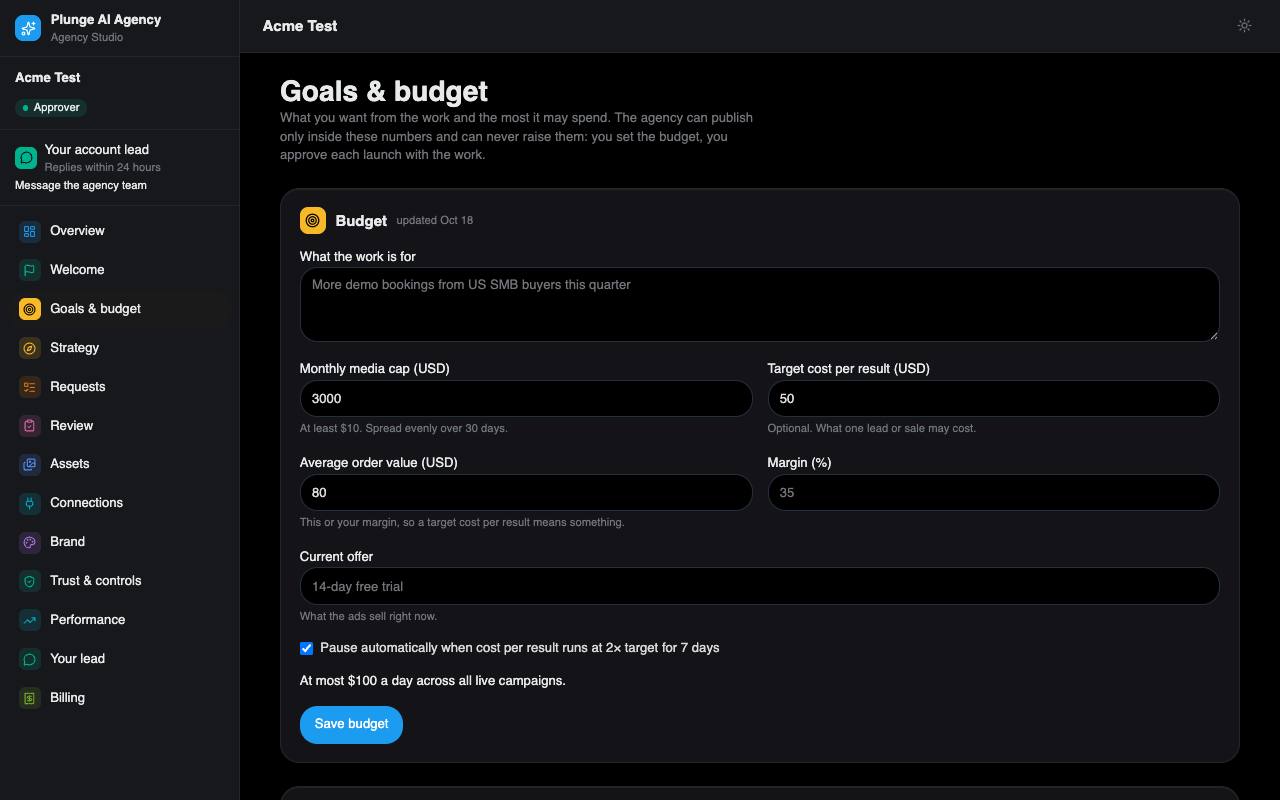
Goals & budget
Only your approver sets these. The agency reads them and cannot change them.
Spending envelope
Monthly cap
The most your campaigns may spend in a month. The daily ceiling for any launch is the cap divided by 30.
Target cost per result
Optional. Used by the stop rule.
Order value or margin
Your average order value or margin, so we judge results in your economics.
Stop rule
When on (the default), a campaign that runs above 2× your target cost for 7 days is paused. The cap pauses every campaign when it is reached, stop rule or not.
You get a notice at 50% and at 80% of the monthly cap. When a campaign is paused on budget, you and your lead are mailed, and you can resume it from this page; a resume at the cap is refused.
Not live yet. Pauses act on published campaigns, and publishing waits for Google's API access.
Outcome plan
Pick 1 to 3 KPIs, give a baseline for each, and optionally a target and the numbers of whoever did the work before us. Set a checkpoint 60 to 90 days out (75 by default). A week before the checkpoint, you and your account lead get a reminder.
GA4 property ID
Enter your Google Analytics 4 property ID (5 to 15 digits) so Performance can read your GA4 numbers next to the ad numbers.
How you sell
Your sales process, sales cycle, close rate, competitors, seasonality and the channels you have tried. Your account lead uses it to draft the monthly strategy you see on the Strategy page once they sign it.