For clients
Sending a brief
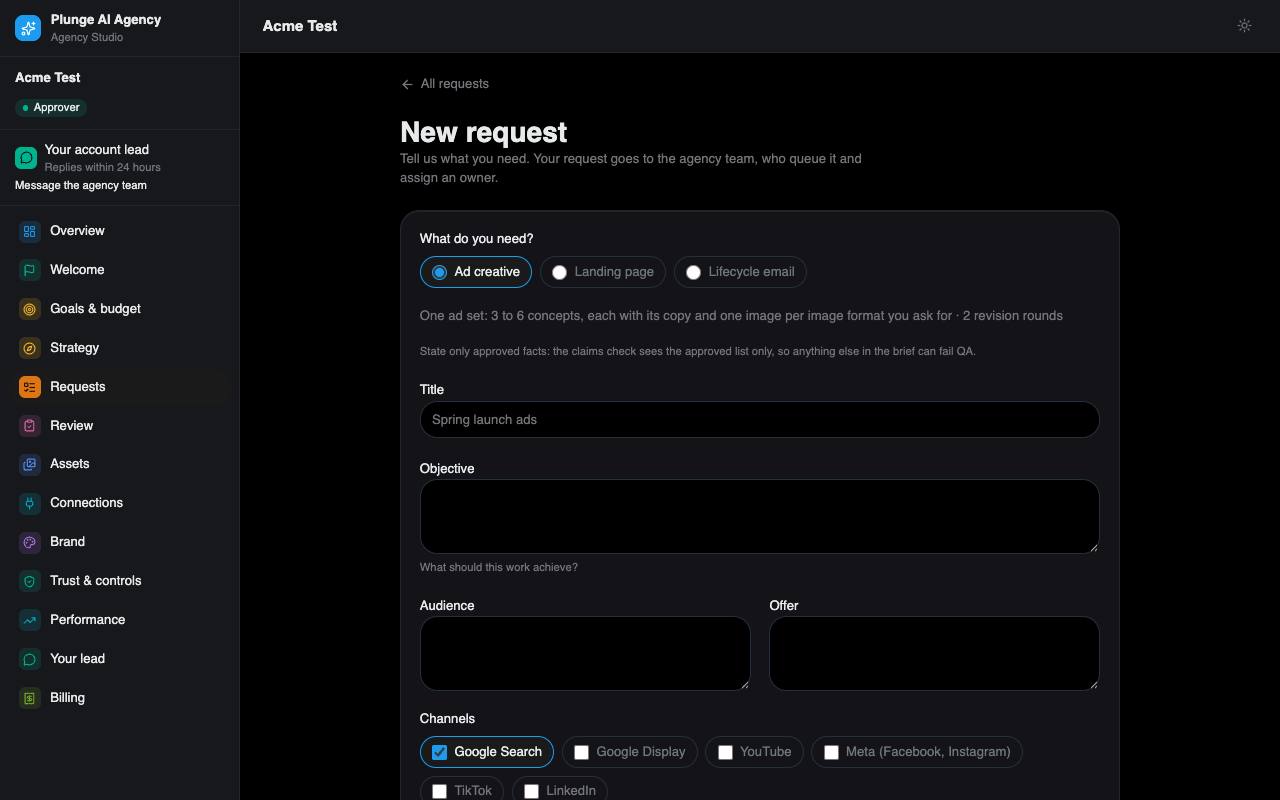
A request is one brief. Approvers send it from Requests › New request (or from Welcome).
- Pick the service line. Ad creative is always offered; landing pages and lifecycle email appear when your plan includes them.
- Write the brief: title, objective, audience, offer, the channels you plan for, the image formats (1:1, 9:16, 16:9; the video formats — an 8-second clip, a 15-second short with captions, a 15-second presenter clip — only if video is on for your workspace), Must say, Must not say, the call to action and notes. A landing page also needs its call-to-action link (https) and the AI disclosure footer; a lifecycle email set asks for 1 to 4 variants.
- Name any real people or voices the work should show (up to 5). Each needs a consent on file (see Trust & controls), or the request is refused.
- Read the unit line and the turnaround above the submit button, tick rush if you need it, and send.
State only approved facts. The writers may quote your brief, and the claims check fails any fact or number that is not on your approved list. Keep new facts out of the brief and add them as claims instead.
What one unit is
| Unit | Holds | Revision rounds |
|---|---|---|
| Ad set | 3 to 6 concepts, each with its copy and one image per image format you ask for | 2 |
| Landing page | one landing page | 2 |
| Email set | 1 to 4 emails | 2 |
The unit line tells you what this brief costs before you send it: on a monthly plan, for example "Uses 1 of 8 this month · 3 used so far"; on a per-piece plan, the price of the piece and when your card is charged. Submit is off when no unit is left. If the price changed while the form was open, the form refreshes and asks you again.
Turnaround
Each kind of work has its own turnaround, counted from a complete brief and stopped while the work is with you. A revision has its own, shorter clock. The agency's current defaults:
| Service line | First delivery | Each revision |
|---|---|---|
| Ad creative | 72 h | 24 h |
| Landing page | 72 h | 24 h |
| Lifecycle email | 48 h | 24 h |
| Custom | 120 h | 48 h |
A package can set its own first-delivery time for ad sets. A rush halves the turnaround, never below 12 hours. When the agency charges for rush, ticking it sends you a change order to accept first; when it does not, the rush applies at once.
After you send
The request starts in Intake, and the system takes it on at once: it assigns an owner (your account lead), makes the agency's internal cost estimate and starts production. If something stops it, such as no units left or an unpaid plan, the agency sees it and the request waits.
The agency may also propose requests from what performed: iterate on a winner or replace a weak ad. A proposal waits on Requests and the overview. Accepting uses a unit; declining needs a reason. A proposal expires after 14 days.
While it is being made
If the agency switched the live view on for its clients, a request in production shows its steps as they finish (writing, checking, making images, and so on): only the steps, never the text in progress, the model or the cost. Your approver can Stop the run, or Stop and change direction with a note; the note becomes the steer of one new run. A stopped run is not retried and, on a per-piece plan, not credited: it was stopped on your request.