Alert
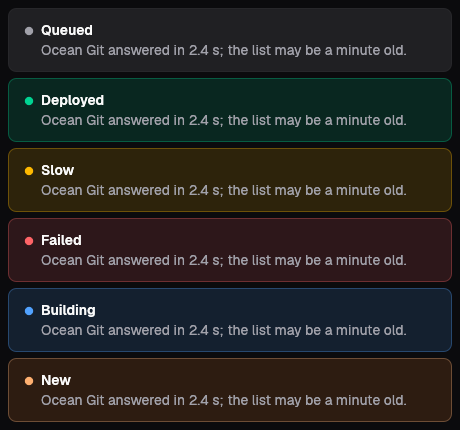
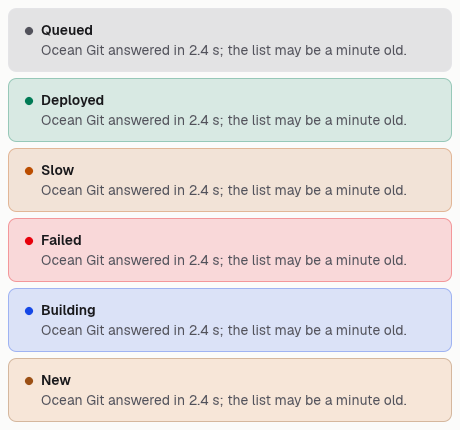
An alert tells the person something about the page they are on, such as a paused sync, a near limit or a failed run. It is one title and one sentence beside a dot in its tone; say what happened and what to do next. On the web only the Bad tone is announced at once, so keep it for what needs attention now.
Information
A title and one sentence.
Sync scheduled
Rows refresh every five minutes.
Alert {
    tone: Tone::Info,
    title: "Sync scheduled".into(),
    sentence: "Rows refresh every five minutes.".into(),
}Success
Says what was done, on what.
Done
Three tickets were closed.
Alert {
    tone: Tone::Ok,
    title: "Done".into(),
    sentence: "Three tickets were closed.".into(),
}Warning
Names the risk and what to do about it.
Budget at 90 percent
Raise the limit or pause the agent.
Alert {
    tone: Tone::Warn,
    title: "Budget at 90 percent".into(),
    sentence: "Raise the limit or pause the agent.".into(),
}Error
A bad tone is announced to screen readers at once.
Could not save
The database did not answer; try again.
Alert {
    tone: Tone::Bad,
    title: "Could not save".into(),
    sentence: "The database did not answer; try again.".into(),
}On the Mac
The same vocabulary drawn by Ocean UI's native face (egui on Metal), as the gallery's snapshot.
Use it
Web
use ocean_ui_core::{Alert, Tone};
Alert { tone: Tone::Warn, title: "Sync paused".into(), sentence: "Reconnect GitHub to resume.".into() }Native
use ocean_ui_native::{Show, core::{Alert, Tone}};
let sentence = "Ocean Git answered in 2.4 s; the list may be a minute old.".into();
Alert { tone: Tone::Warn, title: "Slow".into(), sentence }.show(ui);Cargo feature base of ocean-ui-core, ocean-ui-web and ocean-ui-native; available since 2026-10-29.
In App UI, the callout block draws it from YAML.
Props
| Name | Type | Default | What |
|---|---|---|---|
tone | Tone | Neutral | Neutral, Ok, Warn, Bad, Info or Brand; on both faces only Bad is an alert role; the other tones are read in page order. |
title | String | — | What happened, in a few words. |
sentence | String | — | One sentence that says why it matters or what to do next. |
Accessibility
- A Bad alert is role="alert", so a screen reader announces it when it appears; every other tone is read in page order.
- The dot is aria-hidden; the title and the sentence carry the meaning, never the colour alone.
- The alert holds no controls and takes no focus.
Related
Markdown
The same page as Markdown, for an agent or a pull request.
# Alert
A banner with a title and one sentence, toned for what it says; only a bad one interrupts.
An alert tells the person something about the page they are on, such as a paused sync, a near limit or a failed run. It is one title and one sentence beside a dot in its tone; say what happened and what to do next. On the web only the Bad tone is announced at once, so keep it for what needs attention now.
## Use it
Web:
```rust
use ocean_ui_core::{Alert, Tone};
Alert { tone: Tone::Warn, title: "Sync paused".into(), sentence: "Reconnect GitHub to resume.".into() }
```
Native:
```rust
use ocean_ui_native::{Show, core::{Alert, Tone}};
let sentence = "Ocean Git answered in 2.4 s; the list may be a minute old.".into();
Alert { tone: Tone::Warn, title: "Slow".into(), sentence }.show(ui);
```
Cargo feature `base`; since 2026-10-29.
In App UI the `callout` block draws it ([callout](/ui/blocks/callout.md)).
## Props
| Name | Type | Default | What |
|---|---|---|---|
| `tone` | `Tone` | `Neutral` | Neutral, Ok, Warn, Bad, Info or Brand; on both faces only Bad is an alert role; the other tones are read in page order. |
| `title` | `String` | `—` | What happened, in a few words. |
| `sentence` | `String` | `—` | One sentence that says why it matters or what to do next. |
On the Mac:  
## Examples
### Information
A title and one sentence.
```rust
Alert {
tone: Tone::Info,
title: "Sync scheduled".into(),
sentence: "Rows refresh every five minutes.".into(),
}
```
### Success
Says what was done, on what.
```rust
Alert {
tone: Tone::Ok,
title: "Done".into(),
sentence: "Three tickets were closed.".into(),
}
```
### Warning
Names the risk and what to do about it.
```rust
Alert {
tone: Tone::Warn,
title: "Budget at 90 percent".into(),
sentence: "Raise the limit or pause the agent.".into(),
}
```
### Error
A bad tone is announced to screen readers at once.
```rust
Alert {
tone: Tone::Bad,
title: "Could not save".into(),
sentence: "The database did not answer; try again.".into(),
}
```
## Accessibility
- A Bad alert is role="alert", so a screen reader announces it when it appears; every other tone is read in page order.
- The dot is aria-hidden; the title and the sentence carry the meaning, never the colour alone.
- The alert holds no controls and takes no focus.
## Related
- [Empty](/ui/components/empty.md)
- [Badge](/ui/components/badge.md)
- [Dialog](/ui/components/dialog.md)