Code view
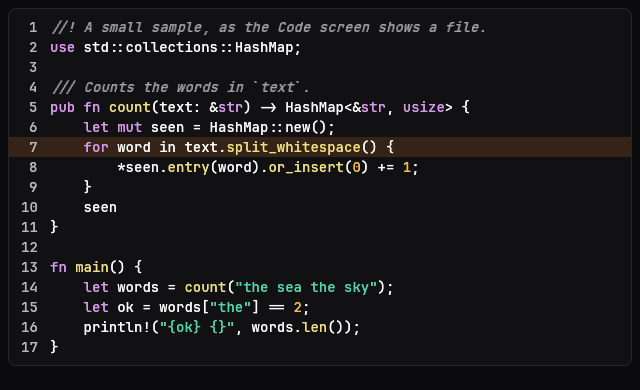
CodeView colours text with the one syntax set and keeps right-aligned line numbers in place while the code scrolls sideways. Only the visible rows are laid out, so a long file scrolls smoothly, and a lit line below the fold is scrolled into view the first time it is set. Lines can wrap at the view's width; unwrapped, a line is cut at 8 KB. The web face does not draw it yet.
No web face yet
Today the Mac draws it through ocean-ui-native; the web face does not draw it yet.
On the Mac
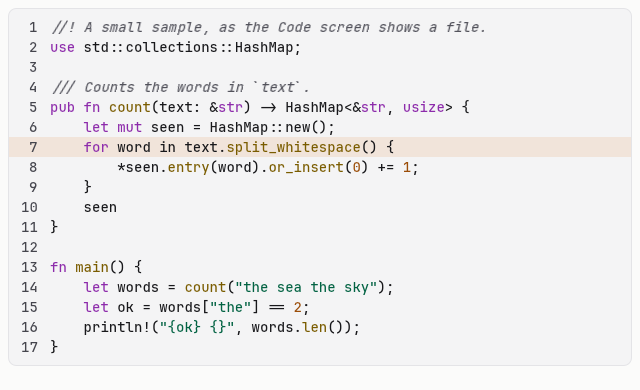
The same vocabulary drawn by Ocean UI's native face (egui on Metal), as the gallery's snapshot.
Use it
Native
use ocean_ui_native::{Show, code_view::CodeView};
CodeView { text: SAMPLE_RS, language: Some("rust"), wrap: false, gutter: true, highlight_line: Some(7) }.show(ui)Cargo feature code of ocean-ui-native; available since 2026-10-29.
Props
| Name | Type | Default | What |
|---|---|---|---|
text | &str | — | The code to show; it is never edited. |
language | Option<&str> | None | A fence name, file name or extension; without one the first line decides, else plain text. |
wrap | bool | false | Wraps long lines at the view's width instead of scrolling sideways. |
gutter | bool | false | Shows the line numbers. |
highlight_line | Option<usize> | None | The line drawn lit, 1-based as the gutter numbers it. |
Accessibility
- The view reports the Code role with a name that gives the language and line count, such as "Code, rust, 17 lines".
- A click focuses it; while it is focused or under the pointer, ⌘A selects all of it and ⌘C copies the text.
- Colours come from the theme's syntax palette in dark and light, and comments are italic as well as coloured.
Related
Markdown
The same page as Markdown, for an agent or a pull request.
# Code view
Read-only code in the mono face, highlighted, beside a gutter of line numbers, with one line lit.
CodeView colours text with the one syntax set and keeps right-aligned line numbers in place while the code scrolls sideways. Only the visible rows are laid out, so a long file scrolls smoothly, and a lit line below the fold is scrolled into view the first time it is set. Lines can wrap at the view's width; unwrapped, a line is cut at 8 KB. The web face does not draw it yet.
## Use it
No web face yet: the Mac draws it through `ocean-ui-native`.
Native:
```rust
use ocean_ui_native::{Show, code_view::CodeView};
CodeView { text: SAMPLE_RS, language: Some("rust"), wrap: false, gutter: true, highlight_line: Some(7) }.show(ui)
```
Cargo feature `code`; since 2026-10-29.
## Props
| Name | Type | Default | What |
|---|---|---|---|
| `text` | `&str` | `—` | The code to show; it is never edited. |
| `language` | `Option<&str>` | `None` | A fence name, file name or extension; without one the first line decides, else plain text. |
| `wrap` | `bool` | `false` | Wraps long lines at the view's width instead of scrolling sideways. |
| `gutter` | `bool` | `false` | Shows the line numbers. |
| `highlight_line` | `Option<usize>` | `None` | The line drawn lit, 1-based as the gutter numbers it. |
On the Mac:  
## Accessibility
- The view reports the Code role with a name that gives the language and line count, such as "Code, rust, 17 lines".
- A click focuses it; while it is focused or under the pointer, ⌘A selects all of it and ⌘C copies the text.
- Colours come from the theme's syntax palette in dark and light, and comments are italic as well as coloured.
## Related
- [Markdown](/ui/components/markdown.md)
- [Copy button](/ui/components/copy.md)
- [Keyboard shortcut](/ui/components/kbd.md)