Grid
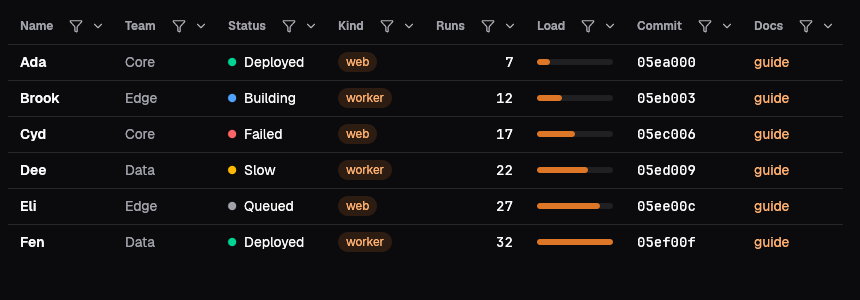
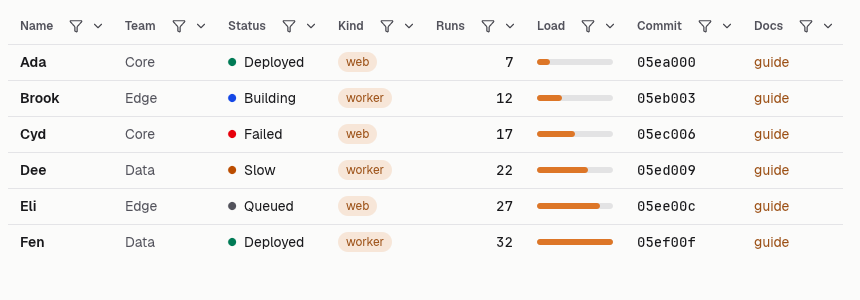
The grid writes the native DataGrid's columns, rows, state and view as a table. Headers link to their sort, a GET form carries the search, the per-column filters, the Columns chooser and the row checkboxes, and the pager links pages and page sizes of 25, 50 and 100, so every view is an address that works without script. state_from_query reads the state from the query and ocean_ui_core::grid::apply computes the view; html_with adds a bulk-action bar inside the form, html_read leaves out the selection column and html_plain is the table alone.
Sorting and paging from the address
Sort, search, filters, columns and page live in the address, so a link keeps the view.
let (cols, rows) = (columns(), rows());
let state = state_from_query(&cols, at.query);
let view = apply(&cols, &rows, &state);
WebGrid { cols: &cols, rows: &rows, view: &view, state: &state, base_href: at.href }.html_read(
    out,
    |_| {},
);A plain table
The table alone, with only the columns that matter; headers still sort.
let (cols, rows) = (columns(), rows());
let state = state_from_query(&cols, "hide=subject,owner");
let view = apply(&cols, &rows, &state);
WebGrid { cols: &cols, rows: &rows, view: &view, state: &state, base_href: at.href }.html_plain(out);Searched to nothing
A search with no match says so inside the table.
let (cols, rows) = (columns(), rows());
let state = state_from_query(&cols, "q=nothing-like-this");
let view = apply(&cols, &rows, &state);
WebGrid { cols: &cols, rows: &rows, view: &view, state: &state, base_href: at.href }.html_plain(out);On the Mac
The same vocabulary drawn by Ocean UI's native face (egui on Metal), as the gallery's snapshot.
Use it
Web
use ocean_ui_web::{Html, WebGrid, state_from_query};
let state = state_from_query(&cols, query); let view = ocean_ui_core::grid::apply(&cols, &rows, &state);
WebGrid { cols: &cols, rows: &rows, view: &view, state: &state, base_href: "/tickets" }.html(&mut out)Native
use ocean_ui_native::grid::{DataGrid, GridOptions};
DataGrid { cols: &cols, rows: &rows, state: &mut state, opts: GridOptions::new("gallery") }.show(ui)Cargo feature grid of ocean-ui-core, ocean-ui-web and ocean-ui-native; available since 2026-10-29.
In App UI, the grid block draws it from YAML.
Props
| Name | Type | Default | What |
|---|---|---|---|
cols | &[GridColumn] | — | The columns, each GridColumn::new(key, label, ColKind), sortable and filterable unless turned off. |
rows | &[GridRow] | — | The rows, each an id, its cells in column order and an optional group. |
view | &View | — | What ocean_ui_core::grid::apply computed: the page's rows, the groups and the total. |
state | &GridState | — | Sort, search, filters, hidden columns, selection, page and page size, usually from state_from_query. |
base_href | &str | — | The page's address; any query it carries is kept in every link and in the form. |
Accessibility
- The table is role="grid" with aria-rowcount, and the sorted header says aria-sort ascending or descending.
- Sorting is a link and filtering a form, so Tab and Enter reach everything; there is no arrow-key cursor on the web.
- The search field is labelled Search rows, each checkbox Select row, and the pager is a nav labelled Pages with the current size marked aria-current.
Related
Markdown
The same page as Markdown, for an agent or a pull request.
# Grid
A server-rendered data table whose sort, search, filters, columns, selection and page live in the address.
The grid writes the native DataGrid's columns, rows, state and view as a table. Headers link to their sort, a GET form carries the search, the per-column filters, the Columns chooser and the row checkboxes, and the pager links pages and page sizes of 25, 50 and 100, so every view is an address that works without script. state_from_query reads the state from the query and ocean_ui_core::grid::apply computes the view; html_with adds a bulk-action bar inside the form, html_read leaves out the selection column and html_plain is the table alone.
## Use it
Web:
```rust
use ocean_ui_web::{Html, WebGrid, state_from_query};
let state = state_from_query(&cols, query); let view = ocean_ui_core::grid::apply(&cols, &rows, &state);
WebGrid { cols: &cols, rows: &rows, view: &view, state: &state, base_href: "/tickets" }.html(&mut out)
```
Native:
```rust
use ocean_ui_native::grid::{DataGrid, GridOptions};
DataGrid { cols: &cols, rows: &rows, state: &mut state, opts: GridOptions::new("gallery") }.show(ui)
```
Cargo feature `grid`; since 2026-10-29.
In App UI the `grid` block draws it ([grid](/ui/blocks/grid.md)).
## Props
| Name | Type | Default | What |
|---|---|---|---|
| `cols` | `&[GridColumn]` | `—` | The columns, each GridColumn::new(key, label, ColKind), sortable and filterable unless turned off. |
| `rows` | `&[GridRow]` | `—` | The rows, each an id, its cells in column order and an optional group. |
| `view` | `&View` | `—` | What ocean_ui_core::grid::apply computed: the page's rows, the groups and the total. |
| `state` | `&GridState` | `—` | Sort, search, filters, hidden columns, selection, page and page size, usually from state_from_query. |
| `base_href` | `&str` | `—` | The page's address; any query it carries is kept in every link and in the form. |
On the Mac:  
## Examples
### Sorting and paging from the address
Sort, search, filters, columns and page live in the address, so a link keeps the view.
```rust
let (cols, rows) = (columns(), rows());
let state = state_from_query(&cols, at.query);
let view = apply(&cols, &rows, &state);
WebGrid { cols: &cols, rows: &rows, view: &view, state: &state, base_href: at.href }.html_read(
out,
|_| {},
);
```
### A plain table
The table alone, with only the columns that matter; headers still sort.
```rust
let (cols, rows) = (columns(), rows());
let state = state_from_query(&cols, "hide=subject,owner");
let view = apply(&cols, &rows, &state);
WebGrid { cols: &cols, rows: &rows, view: &view, state: &state, base_href: at.href }.html_plain(out);
```
### Searched to nothing
A search with no match says so inside the table.
```rust
let (cols, rows) = (columns(), rows());
let state = state_from_query(&cols, "q=nothing-like-this");
let view = apply(&cols, &rows, &state);
WebGrid { cols: &cols, rows: &rows, view: &view, state: &state, base_href: at.href }.html_plain(out);
```
## Accessibility
- The table is role="grid" with aria-rowcount, and the sorted header says aria-sort ascending or descending.
- Sorting is a link and filtering a form, so Tab and Enter reach everything; there is no arrow-key cursor on the web.
- The search field is labelled Search rows, each checkbox Select row, and the pager is a nav labelled Pages with the current size marked aria-current.
## Related
- [Live table](/ui/components/live-table.md)
- [Status](/ui/components/status.md)
- [Badge](/ui/components/badge.md)
- [Empty](/ui/components/empty.md)